Awesome Traffic Bot 2.3 Is Out: AI Agents, Smarter Workflows and 3 Other New Features (2026)
Awesome Traffic Bot 2.3 lets an AI agent build and run your campaigns, gives workflows a plan B when a step fails, and cuts proxy traffic. Here is…
 By Dalga team
14 min read
By Dalga team
14 min read
Product updates
What is new in Awesome Traffic Bot 2.3? Short answer
Awesome Traffic Bot 2.3 (build V2.3.0.0) came out on 19 October 2026 and installs from the Update Center inside the app, with no reinstall. The biggest change is AI agent control: Claude Code, Claude Desktop, Cursor and VS Code can now build and run your campaigns through MCP. It also adds retries, error paths, sub-flows and parallel branches to the workflow editor, plus Advanced Bandwidth Save, a new dashboard and schedules that cover several weekdays in one window.
Key facts
Detail
- Version
- V2.3.0.0, released 19 October 2026
- How to get it
- Update Center inside the app; installs over your current build
- AI agents (MCP)
- Claude Code, Claude Desktop, Cursor and VS Code, connected from the new AI & MCP tab
- Workflow editor
- Retries and an error branch per step, new conditions, JavaScript results in variables, sub-flows, parallel branches
- Advanced Bandwidth Save
- Per-campaign switch; up to about 70% less proxy traffic per visit in our tests
- Dashboard
- Live feed, traffic against the previous period, failed visits with the reason, top-ups in place
- Scheduling
- One window on several weekdays, templates, overnight and multi-day windows
- Improvements
- Dalga IPs built into the campaign (ZIP, ISP or ASN, OS fingerprint), no phantom visits, Autopilot rewrite, better mobile and tablet emulation, http:// sites, Android
- Price
- Unchanged: $24.90/mo on the annual plan ($299/yr) or $49 month to month, 2 devices
ATB 2.3 at a glance
| Awesome Traffic Bot 2.3 at a glance | Detail |
|---|---|
| Version | V2.3.0.0, released 19 October 2026 |
| How to get it | Update Center inside the app; installs over your current build |
| AI agents (MCP) | Claude Code, Claude Desktop, Cursor and VS Code, connected from the new AI & MCP tab |
| Workflow editor | Retries and an error branch per step, new conditions, JavaScript results in variables, sub-flows, parallel branches |
| Advanced Bandwidth Save | Per-campaign switch; up to about 70% less proxy traffic per visit in our tests |
| Dashboard | Live feed, traffic against the previous period, failed visits with the reason, top-ups in place |
| Scheduling | One window on several weekdays, templates, overnight and multi-day windows |
| Improvements | Dalga IPs built into the campaign (ZIP, ISP or ASN, OS fingerprint), no phantom visits, Autopilot rewrite, better mobile and tablet emulation, http:// sites, Android |
| Price | Unchanged: $24.90/mo on the annual plan ($299/yr) or $49 month to month, 2 devices |
Awesome Traffic Bot 2.3 is out today. In Awesome Traffic Bot 2.2 we put campaigns on a visual canvas. This release is about the hours that go into looking after them: checking what ran, fixing flows that broke on a slow page, paying for proxy traffic you didn’t need. The ATB 2.3 release notes list five new features and six improvements, and we go through all of them below.
The AI agent connection gets the most space below because it changes how you work with the app. But if you only try one thing this week, make it the error paths in the workflow editor.
Already a customer? You update in place. New here? Awesome Traffic Bot, the CTR bot your AI agent can run, installs as 2.3 from day one.
Traffic bot MCP: let an AI agent run your campaigns
MCP is the Model Context Protocol, an open standard that lets AI assistants use outside tools. Awesome Traffic Bot 2.3 is an MCP server for browser automation. In practice, a traffic bot MCP connection means you type what you want into your AI client and the agent does the clicking in the app for you.
This sits one level above AI Mode, which made ATB the first AI traffic bot with a model performing the visit. In AI Mode a model performs the visit. With MCP the agent sets up and runs the campaigns, and the bot makes the visits as it always has.
To connect, open AI & MCP in the Awesome Traffic Bot 2.3 sidebar. Your AI provider card is at the top and MCP Access sits below it. MCP Access is off until you switch it to Enabled. Then pick your client’s tab and press its button.
Add To Claude Code adds ATB to Claude Code for all your projects; start a new session and it’s there. For Claude Desktop, quit Claude completely after adding and open it again. Cursor and VS Code open with the server ready to install, and you confirm there. If the app can’t find your client, Manual Setup shows the exact command or config snippet.
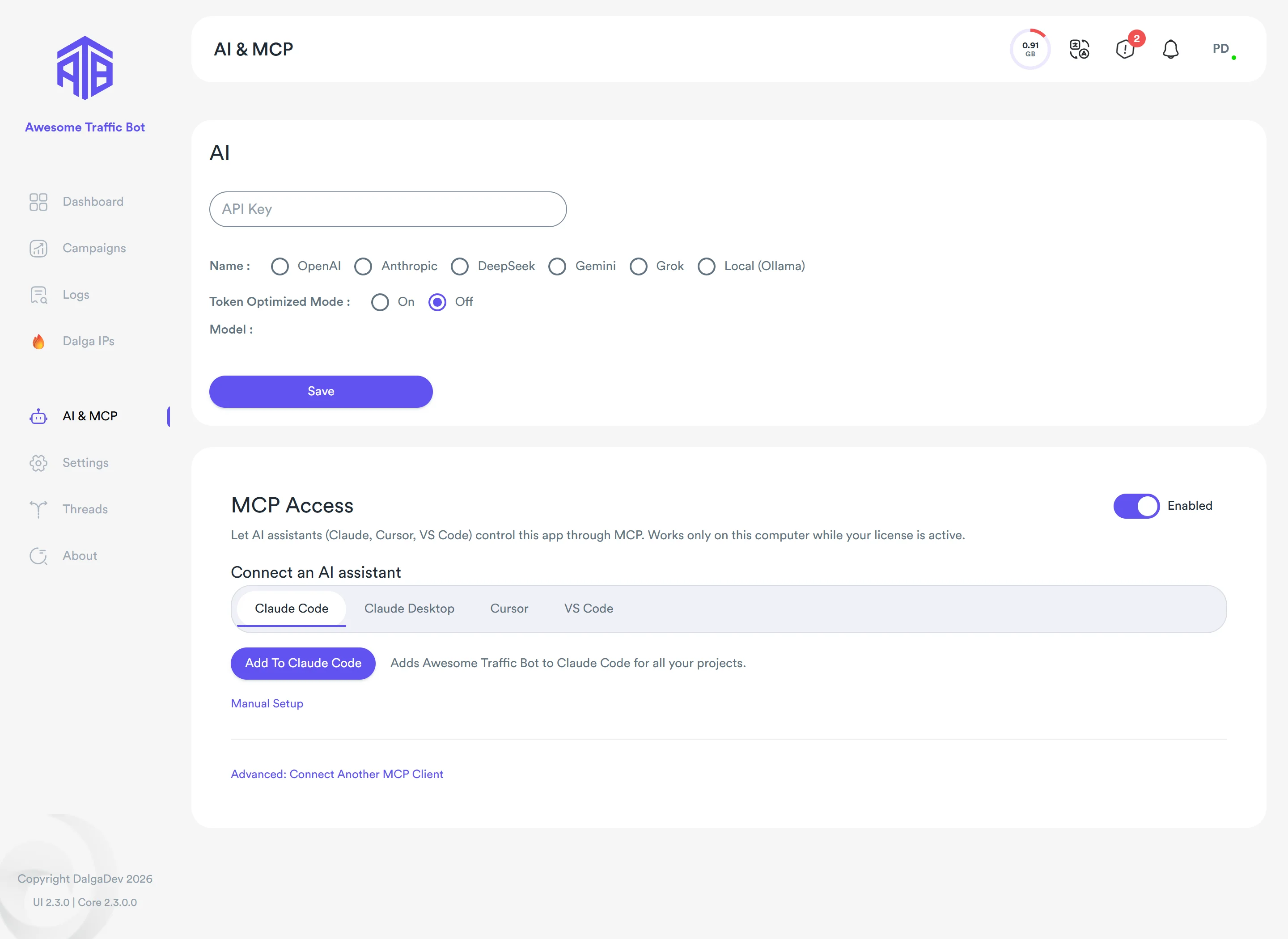
Once connected, the agent can create, edit, validate, start and stop campaigns, build workflows, and read statistics, logs and notifications. Two details make it more than a chatbot with a manual. It can run one test visit of a workflow and get a step-by-step trace back. That visit is real but never counted, and it won’t run while the campaign itself is running. And campaigns the agent creates use Dalga IPs by default, with locations it looks up itself, so it doesn’t make up a proxy setup.
What we type to the AI agent: 4 example prompts
Prompts don’t need to be clever. Four examples, using the demo campaigns from our screenshots:
- “new google campaign for sunrise bakery, keyword ‘bakery austin’, dalga ips austin and dallas, weekdays from 8am. dont start it”. The agent looks up both locations, builds the campaign, validates it and lists what it set. Nothing runs until you say so.
- “run the oakline checkout flow once and tell me where it breaks”. One test visit, not counted. You get back the step that failed and why, for example an add-to-cart click that ran out of retries.
- “how did everything do yesterday? anything failing a lot?”. It reads your statistics and failed visits and answers in a few lines.
- “stop Northwind CRM – Bing”. It stops it. This is where you want your AI client’s own approval prompt switched on.
Start with prompts that read or validate, and hand over start and stop once you trust the results. A CTR bot AI agent is quick and literal, so give it limits the way you would brief a new hire. Keep volumes realistic, as we explain in CTR bots explained. Our AI prompt tips for traffic bots still apply.
With client work, remember that whatever the agent reads (campaign names, URLs, statistics) goes to the model behind your AI client. Manual setup for each client is on the AI agents (MCP) docs page.
Workflow error handling: retries, error branches, sub-flows and parallel tabs
The Flow view in 2.2 put a campaign on a canvas. What it didn’t handle well was a page that misbehaves. A cookie banner loads late, the add-to-cart button is covered for a second, and the visit either stops or carries on blind. In Awesome Traffic Bot 2.3 every step can retry, and a failure can lead somewhere useful.
Example: the Oakline Shop checkout flow
Our demo campaign “Oakline Shop – checkout workflow” uses almost every new piece, so here it is.
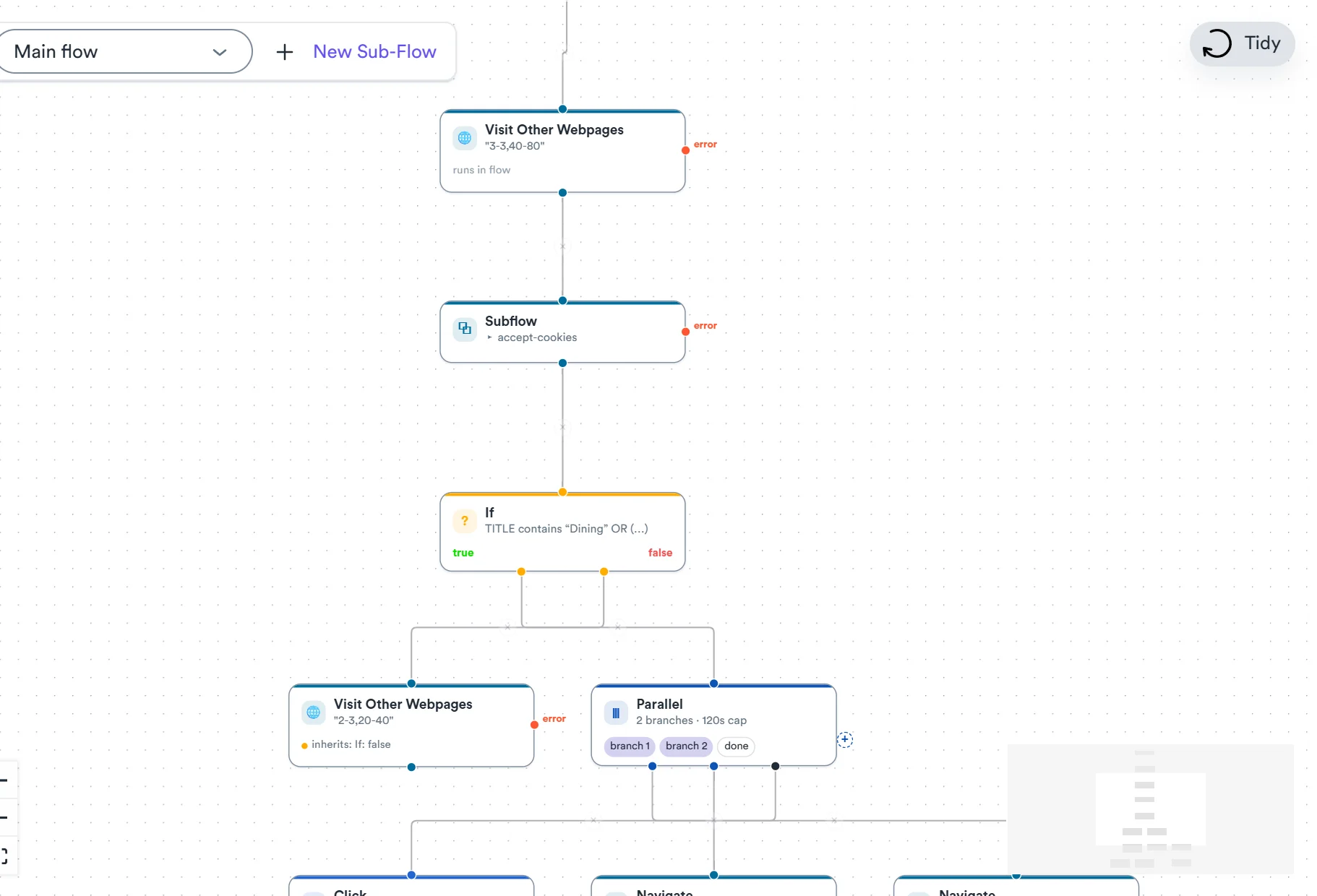
It starts with a sub-flow. We built the cookie-banner clicks once with New Sub-Flow in the bar above the canvas and named it accept-cookies. A Subflow node runs it to the end in the same browser, with the same variables, and then the main flow continues. You can call it from as many places in the flow as you like, and when the banner changes, you fix it once.
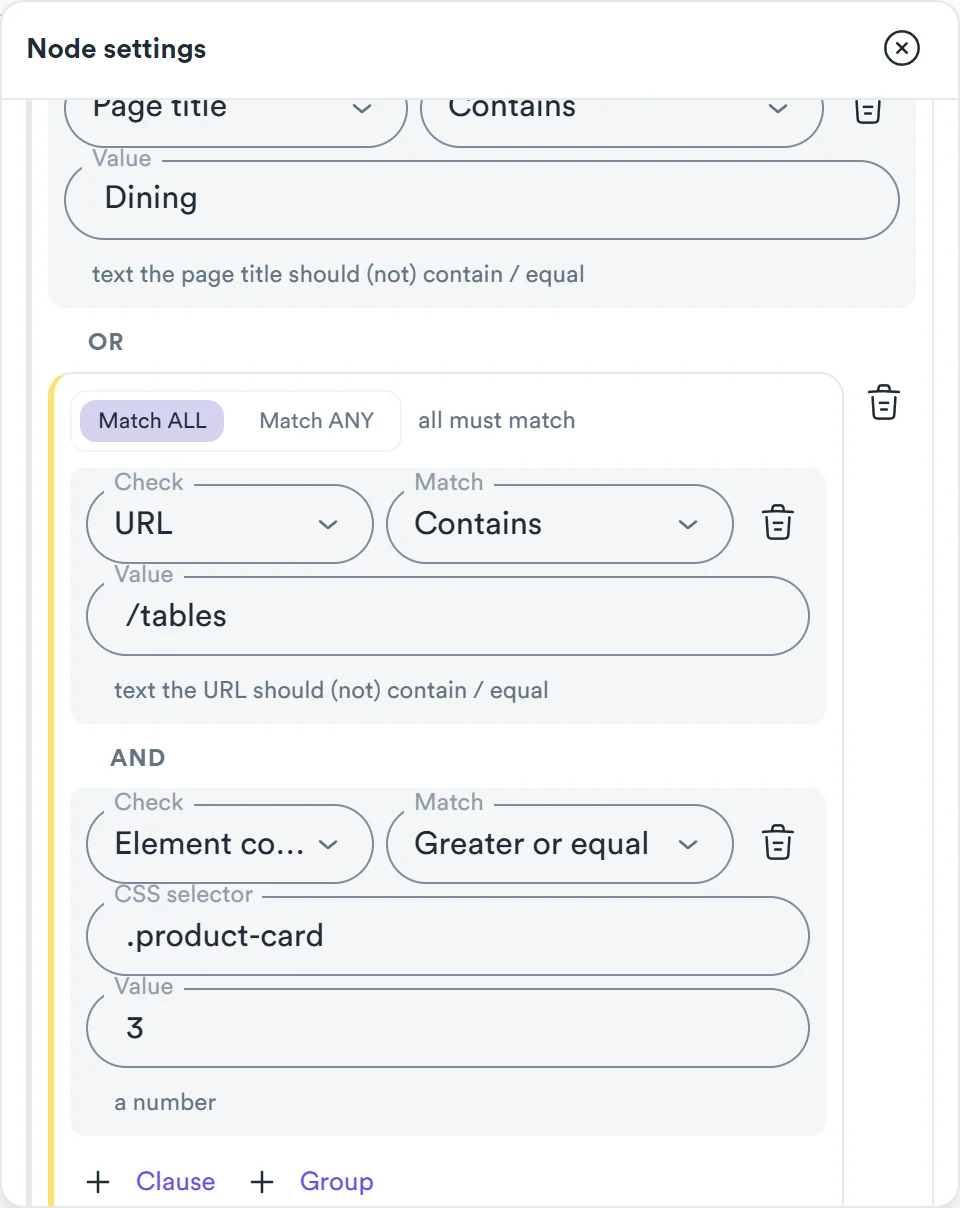
Next, an If node decides whether this page is worth browsing. Its condition: the page title contains “Dining”, OR the URL contains /tables AND there are at least three .product-card elements on the page. Page title, page text, element text, attributes and element count are new things to test in Awesome Traffic Bot 2.3, as is the last step’s status. Comparisons now include greater than, less than and regular expressions.
On the true side, a Parallel node sends the visitor to /reviews in one new tab and to /delivery in another. The branches run one after another, each in its own tab of the same browser, the way a person opens a couple of tabs before deciding. When both are done, or the time cap runs out (300 seconds unless you change it), the extra tabs close and the flow continues from done in the original tab. You can add up to five branches.
Then the click that matters: add to cart. Under Error handling we set Retries to 2 and Retry delay (s) to 3. If the button still can’t be clicked after the third try, the red error handle sends the visit to a Go Back step. Steps without an error path use When it fails instead, which is either Continue the flow or Stop the visit.
Last, an Inject JS step reads how many items ended up in the cart and keeps the number with Save result as variable, as cart_items. Any later step or condition can use {{cart_items}}.
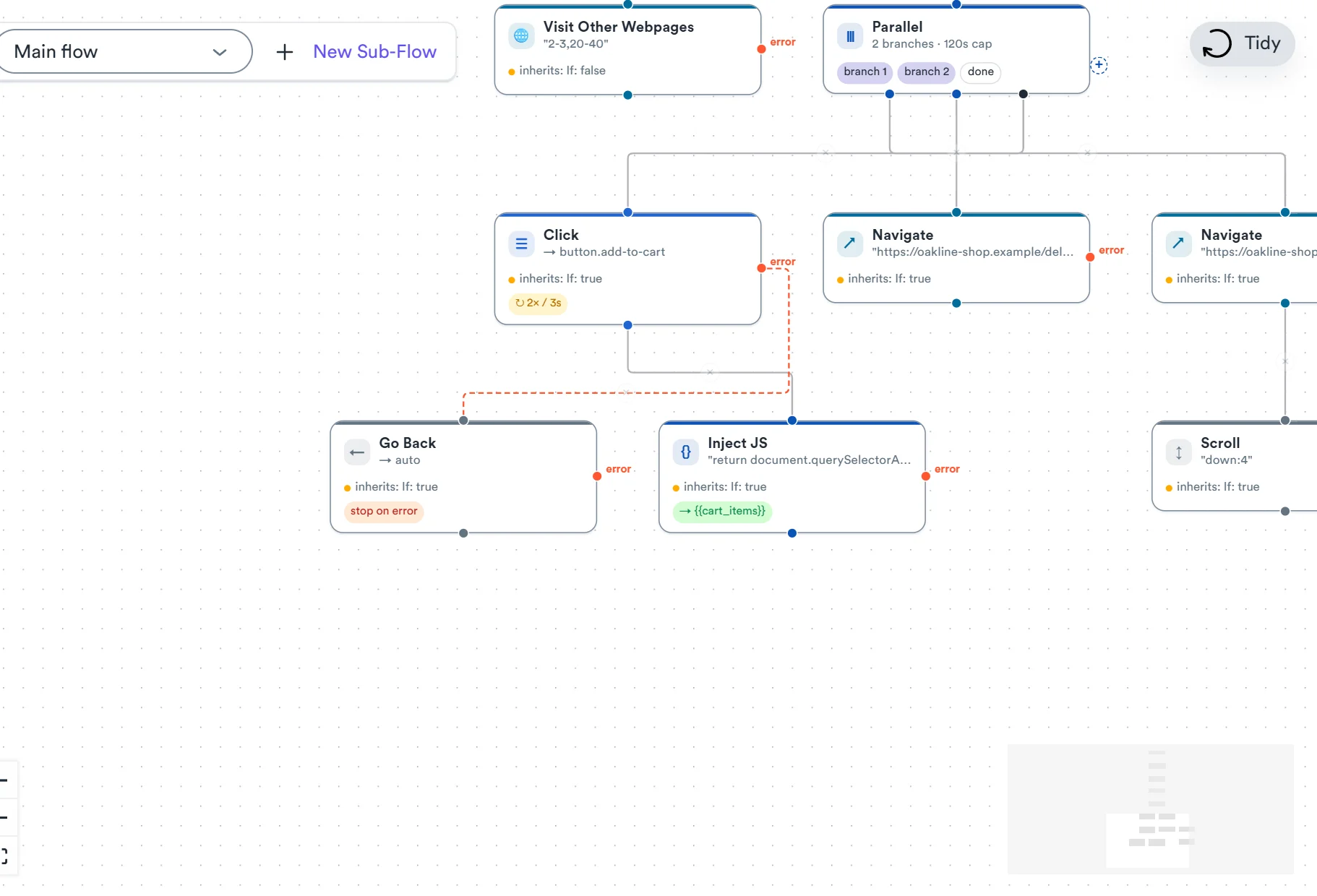
Press Tidy when the canvas gets crowded. And if you’ve connected an agent, ask it for one test visit before you copy a flow to the next client. Every node is described in the flow editor docs.
Error paths, sub-flows and the AI agent connection come with every Awesome Traffic Bot 2.3 license. See the plans.
Advanced Bandwidth Save: up to 70% less residential proxy bandwidth
Residential proxies are billed by the gigabyte, and most of a visit’s weight isn’t the page you care about. It’s the same scripts, stylesheets, fonts and images, downloaded again by every new visitor through the proxy. Advanced Bandwidth Save in Awesome Traffic Bot 2.3 stops paying for the repeats.
It’s a switch in step 1 of the campaign wizard, in its own card above Block Resources. With it on, the first visits of a campaign save the site’s files and later visitors reuse them. In our tests that came to up to about 70% less proxy traffic per visit. Your number will depend on how heavy the site is.
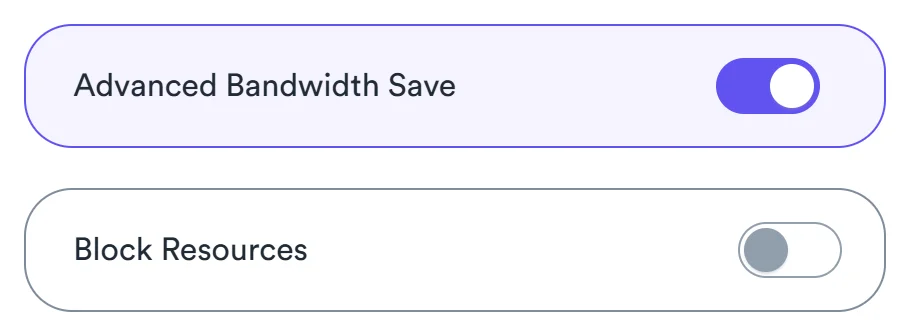
Two things to expect. Switching it on also turns on Block Resources for video and audio, so turn those back off if your journey plays a video. And the saving shows up after the first few visits, because those are the ones preparing the files. The visit log says on each visit whether saved files were used, were still being prepared, or were skipped.
We run it on “Sunrise Bakery – Google, Austin”, which uses Dalga IPs, where every plan includes 2 GB a month. It helps just as much with your own proxies; our traffic bot proxy setup guide covers that side.
New dashboard: live visit feed and the reason each visit failed
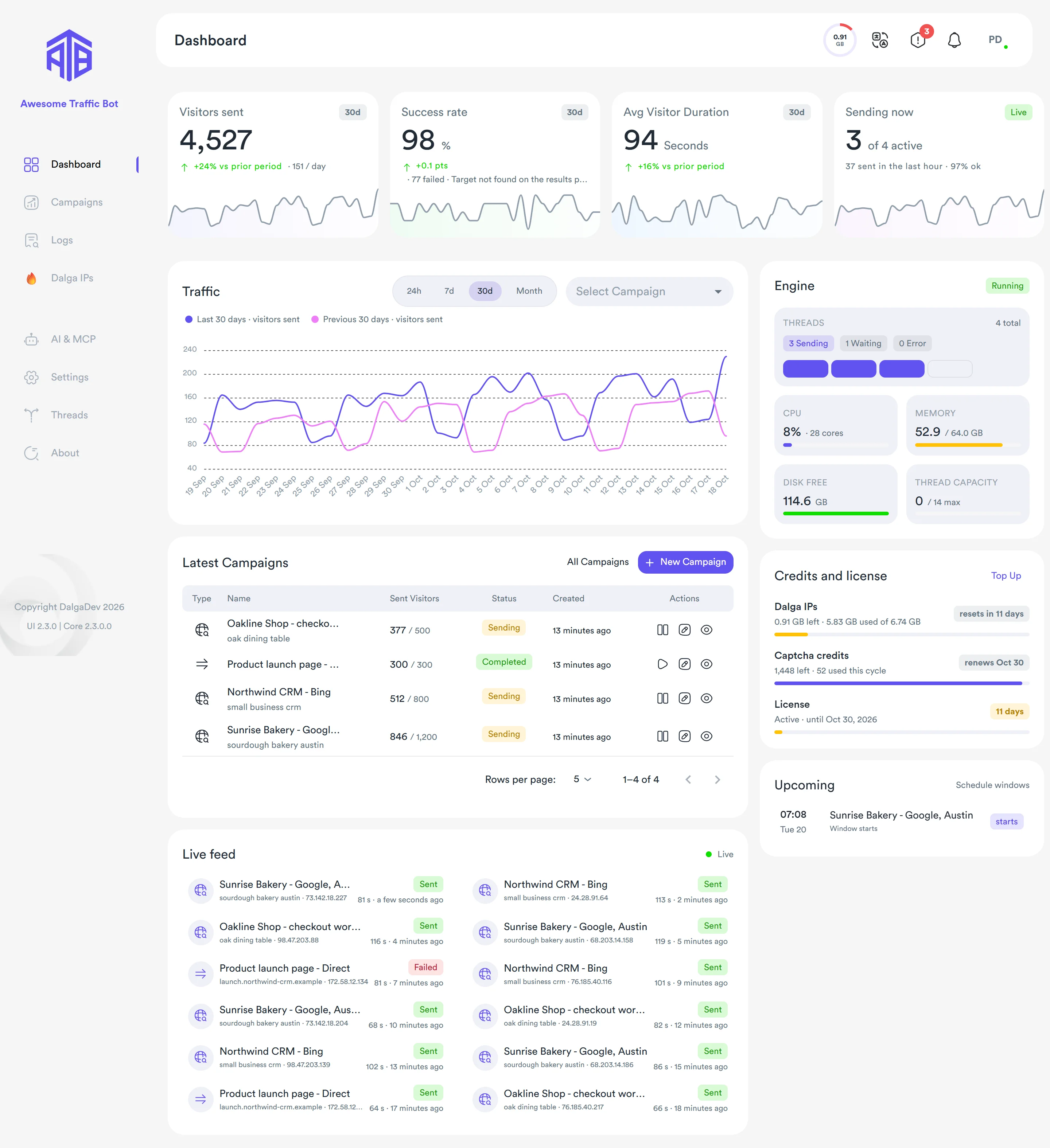
The dashboard is the first page you see, and in Awesome Traffic Bot 2.3 it’s new. It’s built around the question you open the app with: is it sending, and is anything broken?
- Stat tiles for visitors sent, success rate (with the most common failure reason), average visit duration and campaigns sending now.
- Traffic over 24 hours, 7 days, 30 days or a month, drawn against the previous period, for all campaigns or one.
- Live feed of recent visits, refreshed every 10 seconds, each marked Sent, In progress or Failed.
- Latest Campaigns, where you can start, stop or edit a campaign from its row.
- Credits and license, with a Top up button for captcha credits and Dalga IPs bandwidth that works without leaving the page.
The failure reason is the part we look at most. A proxy that won’t log in and a click that can’t find its button need different fixes, and now you see which one it is without digging through logs.
Weekday scheduling: one window for Monday to Friday
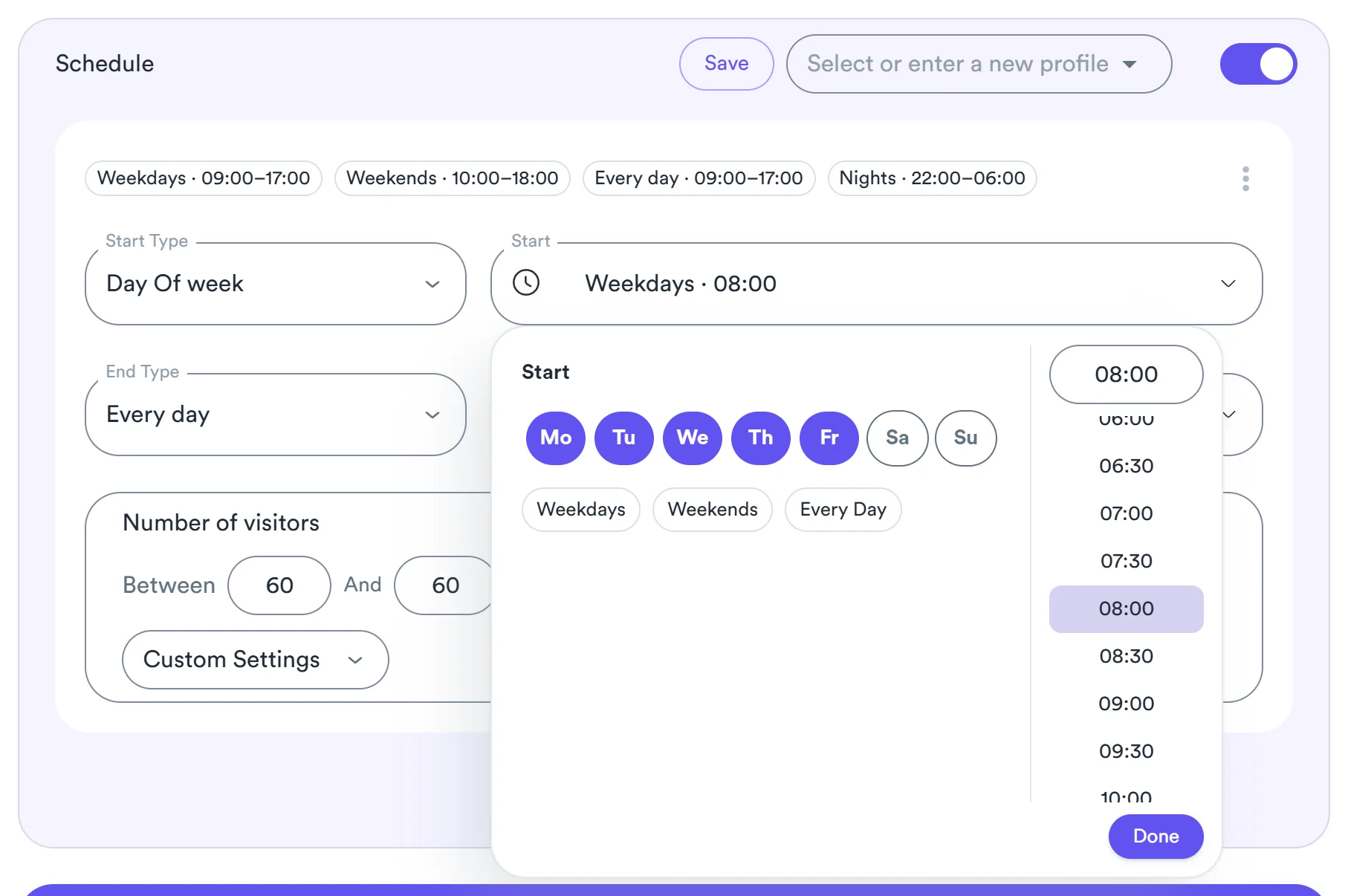
In 2.2 a schedule window started on a single weekday, so Monday to Friday meant five windows. In Awesome Traffic Bot 2.3 one window can start on several days. Sunrise Bakery runs Monday to Friday from 08:00 with a single window.
Templates fill a window in one click: Weekdays (09:00 to 17:00), Weekends (10:00 to 18:00), Every day (09:00 to 17:00) and Nights (22:00 to 06:00). One picker sets both the day and the time. Windows can run overnight or across days, Friday 18:00 to Monday 08:00 for example. Each window keeps its own visitor limit, so a night window can send less than the daytime one.
A reminder, because it catches people out: a schedule limits when a running campaign may send. It doesn’t start a stopped one. The schedule docs explain how windows and the campaign’s total visitor count work together.
Improvements in Awesome Traffic Bot 2.3
Dalga IPs: residential IPs by ZIP code, ISP, ASN and OS fingerprint
In Awesome Traffic Bot 2.3, Dalga IPs, the residential IP service built into the traffic bot, lives inside the campaign. On the Connection step you choose Dalga IPs, add one or more locations, and the app gets the proxies from your Dalga account automatically. No proxy list to paste, no credentials to copy.
A location is a country, and optionally a region and a city. Advanced Configuration gets you residential proxies with ZIP code targeting, a specific ISP or ASN, and the OS fingerprint the connection shows (Windows, macOS, Linux or Android). Every option shows how many IPs are online for it, so you know whether a small town has enough IPs before you plan a week of visits there.
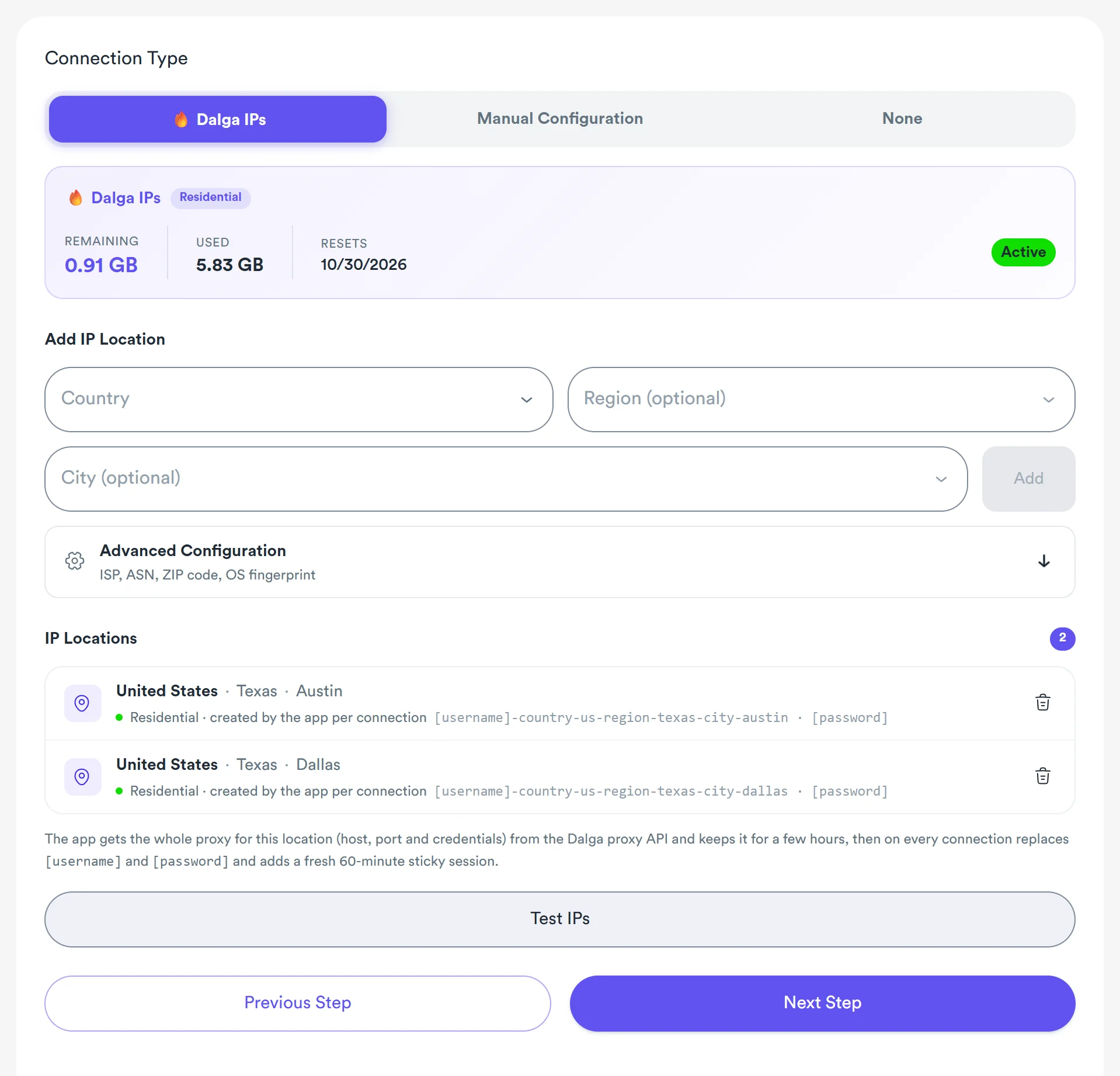
For Sunrise Bakery we added Austin and Dallas and pressed Test IPs to try them before the first run. For Google Maps campaigns, ZIP-level IPs for Google Maps CTR put each visit near the business; a ZIP code is as close as it gets. Every plan includes 2 GB of Dalga IPs a month, and you can top up in the app. Targeting is covered in the Dalga IPs docs.
Counting, Autopilot, devices and Android
- No more phantom visits. Failed browser launches, failed navigations and proxies that can’t log in are never counted as sent.
- Autopilot rewrite. Time per visit is realistic, the last visit of a campaign finishes, pauses can be interrupted, Stop All holds under load, and paused campaigns never resume on their own.
- Mobile and tablet emulation uses each device’s own screen size and pixel ratio, from a larger device pool.
- Plain http:// sites load again.
- Android. One slow phone no longer stops the others, and the VPN app recovers after a reboot or when it gets stuck.
The phantom visits fix is the one we’re happiest about in Awesome Traffic Bot 2.3. If a counter says 500 sent when only 430 visits loaded, it’s worse than having no counter.
How to update to Awesome Traffic Bot 2.3
Click the exclamation icon in the top bar to open the Update Center, and press Download. The update downloads in the background, installs over your current build and restarts the app. Your license, campaigns and settings stay as they are. If Awesome Traffic Bot 2.3 isn’t listed yet, restart the app once; it checks for updates on launch.
Like every Awesome Traffic Bot update, it’s included in your license. Let running campaigns finish first, or stop them, so the restart doesn’t cut a visit short. Afterwards, connect your AI client under AI & MCP, and switch on Advanced Bandwidth Save for your heaviest campaign, then read the visit log for its first few visits.
New to ATB? The installer is on the product page. The full release notes are in the changelog, and the updates docs cover what to do if a download is interrupted.
Frequently asked questions about Awesome Traffic Bot 2.3
Do I need to reinstall to get Awesome Traffic Bot 2.3?
No. Open the Update Center from the exclamation icon in the top bar and press Download. ATB 2.3 installs over your current build, and your license, campaigns and settings stay in place.
Is Awesome Traffic Bot 2.3 free for existing users?
Yes. Like 2.2 before it, Awesome Traffic Bot 2.3 is a regular update within your license. MCP, the workflow editor changes, Advanced Bandwidth Save, the dashboard, the new schedules and the Dalga IPs improvements are all included. Top-ups for captcha credits and Dalga IPs bandwidth stay optional, as before.
Which AI agents work with ATB 2.3?
Claude Code, Claude Desktop, Cursor and VS Code each get a one-click button under AI & MCP in Awesome Traffic Bot 2.3, plus a Manual Setup option. Other MCP clients that connect by URL can use the address and access key under Advanced on the MCP Access card. The AI client runs on the same computer as the app.
Is MCP free in Awesome Traffic Bot 2.3?
Not from us. MCP is part of Awesome Traffic Bot 2.3 at no extra cost. The AI client is your own: Claude Code, Claude Desktop, Cursor and VS Code each follow their own plans and pricing, so check what yours includes before you plan heavy agent use.
Does Advanced Bandwidth Save change how visits look?
The journey stays the same: the same steps in the same browser, each visit through its own IP. What changes is where the site’s files come from, because later visitors reuse saved files instead of downloading them again through the proxy. It also blocks video and audio unless you turn that back off. The visit log shows on each visit whether saved files were used.
What is an MCP server, and what does the one in Awesome Traffic Bot 2.3 do?
MCP (Model Context Protocol) is an open standard that lets AI assistants use outside tools. Awesome Traffic Bot 2.3 is an MCP server: Claude Code, Claude Desktop, Cursor or VS Code can create, edit, validate, start and stop campaigns, build workflows, and read statistics, logs and notifications.
How do I add Awesome Traffic Bot to Claude Code?
Open AI & MCP in the app, switch MCP Access to Enabled, open the Claude Code tab and press Add To Claude Code. Then start a new Claude Code session. If the app can’t find Claude Code, Manual Setup shows the command to run.
Can Claude Code control a traffic bot?
Yes, through the MCP server in ATB 2.3. The agent sets up and runs the campaigns, and the bot opens the browsers and makes the visits. It can also run one uncounted test visit of a workflow and read back the step that failed.
What is ASN targeting, and how is it different from ISP targeting?
An ASN is the number a network’s IP block is registered under (AT&T, for example, is AS7018). ISP targeting picks the provider by name, while ASN targeting picks one specific network, which matters when a provider runs several. In Dalga IPs, every option shows how many IPs are online.
Try it on your own campaigns
Existing users: open the Update Center and you’re done. New users: Awesome Traffic Bot 2.3 starts at $24.90 a month on the annual plan, or $49 month to month, for two devices, with 2 GB of Dalga IPs bandwidth and 1,000 captcha credits every month. If you’d rather test it on your own keywords first, a one-day trial costs $5.
Recommend the tools you already use and earn recurring commission through the Dalga affiliate program.
Awesome Traffic Bot
Awesome Traffic Bot drives realistic search, referral, direct, and social traffic with built-in residential IPs and AI-driven browsing. Boost CTR across Google, Bing, Yandex, and DuckDuckGo, with no proxies or setup required.
- per month, annual plan ($299/yr)
- $24.90
- per month, monthly plan
- $49
- devices
- 2
Written by the Dalga team
We design and build Dalga products. Guides and release notes live on the blog, and every setting is documented on docs.dalga.dev.
Keep reading
All Product updates postsAwesome Traffic Bot 2.2 Is Live: 4 New Features That Change CTR Campaigns (2026)
Awesome Traffic Bot 2.2 adds an included captcha solver, a visual workflow editor, browser profile storage, and local AI through Ollama. What changed, where to find it, and how to update.
Awesome Traffic Version 2.0.6 Released
The big update of Awesome Traffic Bot version 2.0.6, with features designed to simplify your workflow.
Awesome Traffic Bot 2.0 is coming soon!
Awesome Traffic Bot 2.0 has been released. Download the latest version from the panel where you purchased the application.