Send social traffic to your website
Direct Mode with a social media referrer.
 By Dalga team
Updated
3 min read
By Dalga team
Updated
3 min read
Social media referrer · since 1.5.3
- Setting up social traffic
- Choosing a referrer
- How the visits show in Google Analytics
How to Send Social Traffic to Your Website
To send social traffic to your website you first need to open up the software. When you opened it we’re ready to go! You’ll need to: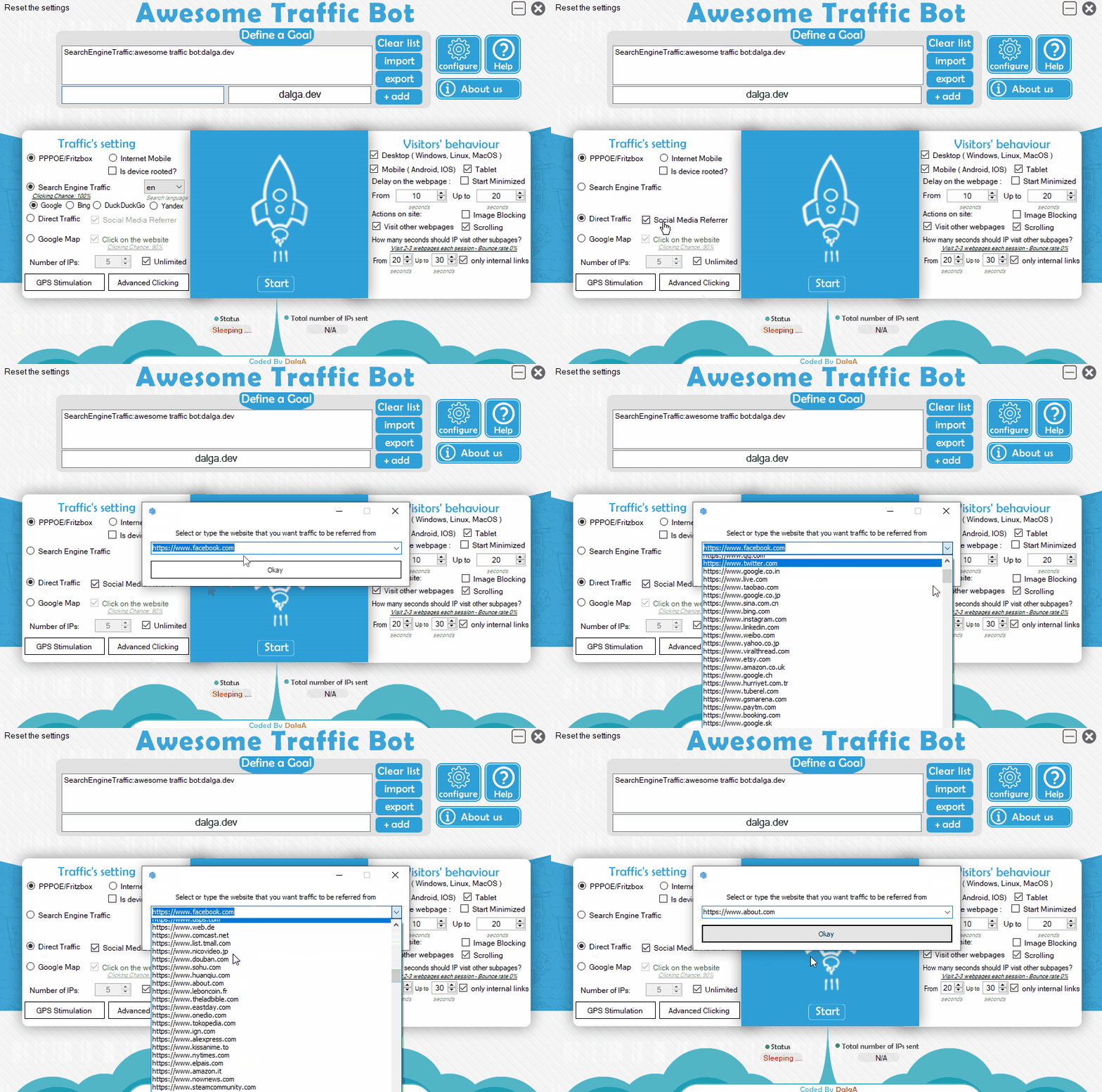 STEP1: Enter the webpage address in the bot. You can also import them from a text file. (Each website should be in a separate line).
In this case, we want to send clicks to dalga.dev. So, we enter dalga.dev as a website/webpage the bot should send traffic to.
STEP2: Choose the IP changing method you want to use. The ATB has a full toolkit of different IP changing modes starting from unique approaches (Phone mode, PPPoE-FritzBox) to Proxy and VPN. There’s a wide range of available tools you can select from. If you want to send traffic from other countries, we recommend you use the VPN or Proxy mode.
STEP3: Select and click on Direct Traffic as the traffic mode then we’re ready to configure the social media referrer. In this example, we want to drive traffic from about.com as our referrer. So we select about.com from the list and also finally enable the social media referrer option.
STEP1: Enter the webpage address in the bot. You can also import them from a text file. (Each website should be in a separate line).
In this case, we want to send clicks to dalga.dev. So, we enter dalga.dev as a website/webpage the bot should send traffic to.
STEP2: Choose the IP changing method you want to use. The ATB has a full toolkit of different IP changing modes starting from unique approaches (Phone mode, PPPoE-FritzBox) to Proxy and VPN. There’s a wide range of available tools you can select from. If you want to send traffic from other countries, we recommend you use the VPN or Proxy mode.
STEP3: Select and click on Direct Traffic as the traffic mode then we’re ready to configure the social media referrer. In this example, we want to drive traffic from about.com as our referrer. So we select about.com from the list and also finally enable the social media referrer option.
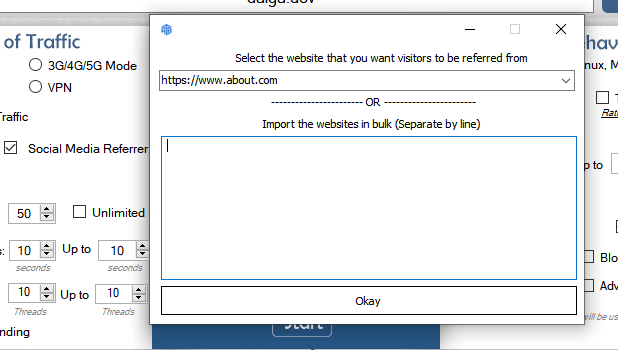 NOTE: This method will put the selected social media in the browser’s request headers. So every analytical tool will show this social traffic is driven by the selected social media. However, this might not have a huge impact on your website. If you want to use this for SEO, we recommend you use the Search Engine Mode.
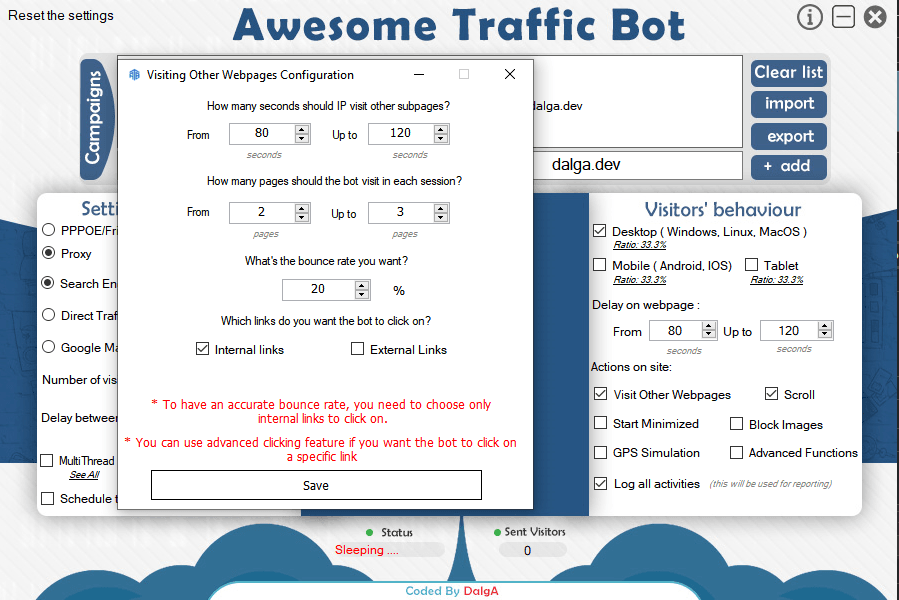
STEP4: Configure the visitors’ behavior. The ATB gives you the ability to choose a delay range for each visitor and other advanced stuff. We recommend you to choose 80~120 seconds as session duration (delay on the webpage) and also enable visiting other webpages to visit 2~3 pages for 80~120 seconds with a 20% bounce rate. You can do any other settings as you wish. You can also choose any device you would like to send traffic from.
NOTE: Settings can vary depending on your needs (number of clicks you need, etc.). By this recommended configuration you will get about 20*24 clicks per day with a single thread. You can use more threads to send more and more clicks. You can read about multi-threading in the instructions.
NOTE: This method will put the selected social media in the browser’s request headers. So every analytical tool will show this social traffic is driven by the selected social media. However, this might not have a huge impact on your website. If you want to use this for SEO, we recommend you use the Search Engine Mode.
STEP4: Configure the visitors’ behavior. The ATB gives you the ability to choose a delay range for each visitor and other advanced stuff. We recommend you to choose 80~120 seconds as session duration (delay on the webpage) and also enable visiting other webpages to visit 2~3 pages for 80~120 seconds with a 20% bounce rate. You can do any other settings as you wish. You can also choose any device you would like to send traffic from.
NOTE: Settings can vary depending on your needs (number of clicks you need, etc.). By this recommended configuration you will get about 20*24 clicks per day with a single thread. You can use more threads to send more and more clicks. You can read about multi-threading in the instructions.
 STEP5: Run the bot!
Expected results: You’ll get social traffic recorded on any analytical tool you use, especially Google Analytics.
STEP5: Run the bot!
Expected results: You’ll get social traffic recorded on any analytical tool you use, especially Google Analytics.
Referrer campaigns are one traffic source among several. Awesome Traffic Bot works as a social traffic bot and a search CTR tool under one license, with residential IPs included.
Frequently Asked Questions
For the bigger picture on how click through rate signals work, read our guide on how CTR bots work and when to use them.
Does social traffic help SEO rankings?
Not directly. Referrer-based social traffic is mainly useful on the analytics side; for SEO signals, use the Search Engine mode instead.
Which referrers can I choose?
Facebook, Twitter/X, and many other popular websites — pick any referrer from the list, or run several campaigns with different referrers.
Will Google Analytics show the visits as social traffic?
Yes. The referrer is set in the browser’s request headers, so analytics tools attribute the sessions to the social network you selected.
Awesome Traffic Bot
Awesome Traffic Bot drives realistic search, referral, direct, and social traffic with built-in residential IPs and AI-driven browsing. Boost CTR across Google, Bing, Yandex, and DuckDuckGo, with no proxies or setup required.
- per month, annual plan ($299/yr)
- $24.90
- per month, monthly plan
- $49
- devices
- 2
Written by the Dalga team
We design and build Dalga products. Guides and release notes live on the blog, and every setting is documented on docs.dalga.dev.
Keep reading
All Search & CTR postsAwesome CTR Bot Already Adapted to Google’s New “goto” Link Update (2026)
Google’s new “goto” update is making headlines across the SEO industry, and Awesome CTR Bot has already adapted to it.
CTR Bots Explained: Your Guide to Better Click Rates
You research the right keywords, build backlinks and make great content, and your site still sits on page two. What a CTR bot does about it.
Google News CTR by Awesome Traffic Bot
A way to set up Awesome Traffic Bot’s advanced functions for Google News articles CTR.