Older windows versions are getting deprecated one by one. It’s time for Windows 8.1 (and windows server 2012) now. Google Chrome started discounting the updates for windows 8.1 (and windows server 2012). It means we’re going to say goodbye to this Operating System as well.
Chrome 109 was the last release that runs on Windows 8.1 and Windows Server 2012/2012 R2. From early 2023 on, Google only ships new Chrome and Chromium builds for Windows 10 and newer, which means security patches, new web features, and bot-related fixes no longer reach Windows 8.1 machines. You can read Google’s official announcement here: Sunsetting support for Windows 7 / 8 / 8.1 and Windows Server 2012.
The previous versions of ATB will continue working with the older chrome versions, but since V1.6.8 and later, the ATB has newer versions included. By saying that, you would need to prepare an upgrade for your operating system. However, if you’re still using windows 8.1 and want to get the latest version of the bot, there’s still a way to keep on with the newer versions.
Please note that this solution doesn’t work for windows 7. Windows 7 is no longer supported since 2021 by the ATB.
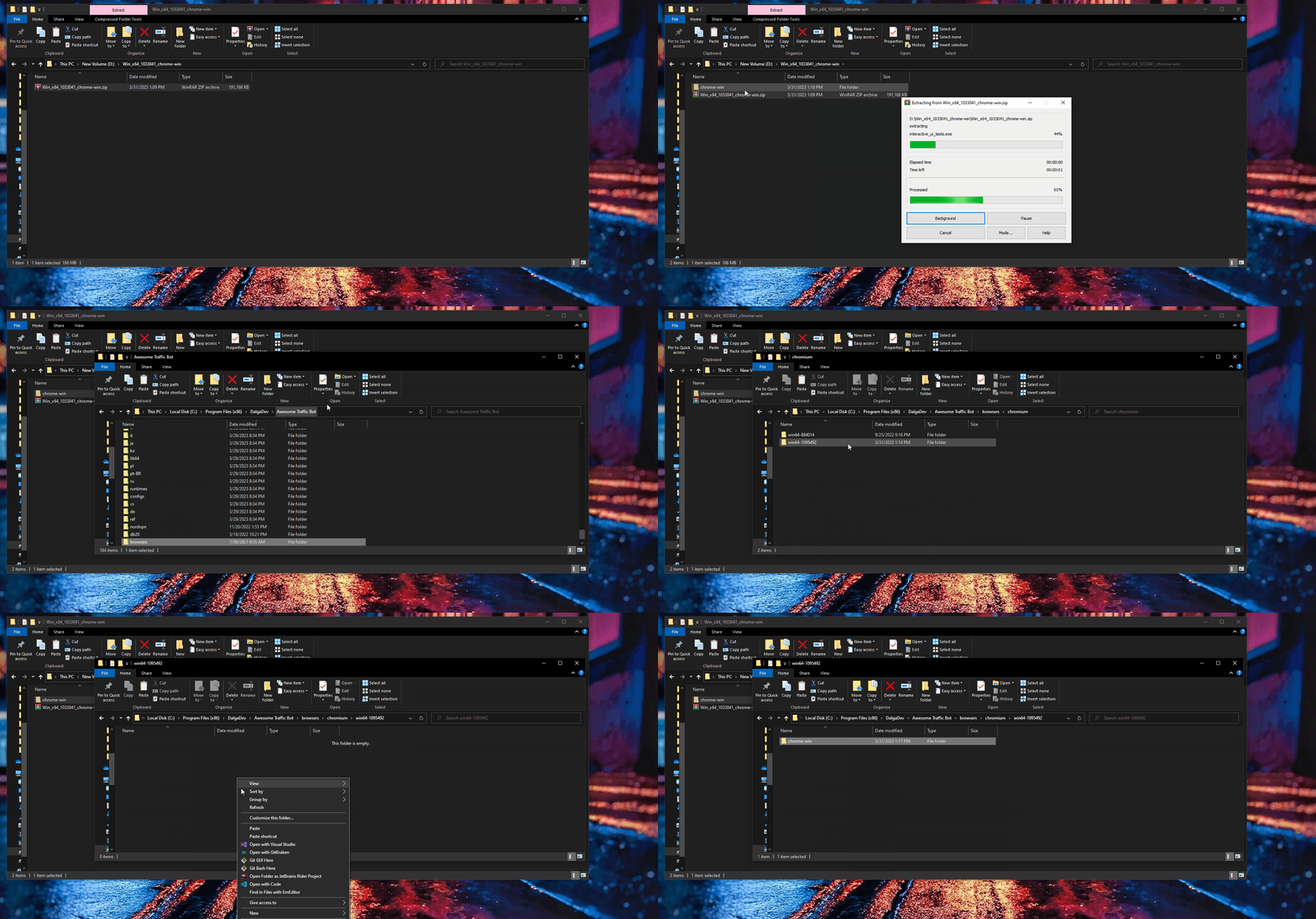
To use the bot on windows 8.1 or windows server 2012, you would need to download older chromium from
Then you would need to replace chrome-win folder with the one in (C:\Program Files (x86)\DalgaDev\Awesome Traffic Bot\browsers\chromium\win64-1095492).
This should solve the issue for you. However, we do recommend to update your windows to support all next features. We'll use newer chromium versions in each new updates.
Every Awesome Traffic Bot release up to V1.6.7 ships with a Chromium build that still runs on Windows 8.1, so those installations keep working without any changes. Starting with V1.6.8, the bot bundles a newer Chromium that requires Windows 10 or later — that is the only piece the workaround above swaps out. The rest of the application, including campaigns, IP-changing modes, and scheduling, behaves exactly the same on Windows 8.1 after the folder replacement. You can always grab the latest installer from your account downloads page.
For the bigger picture on how click through rate signals work, read our guide on how CTR bots work and when to use them.
No. Windows 7 has not been supported by Awesome Traffic Bot since 2021, and the older Chromium build used in this workaround does not resolve that.
Yes. The same Chromium folder replacement works for Windows Server 2012 and 2012 R2, which lost Chrome support at the same time as Windows 8.1.
Yes — the bot’s core features work normally, but some newer features depend on newer Chromium builds, so we recommend upgrading your operating system when possible.
Check the browsers\chromium folder inside the installation directory — the folder name contains the build number (for example, win64-1095492).
It works with this fix, but an unsupported operating system stops receiving security updates. For long-term campaigns we recommend moving to Windows 10 or 11, or running Awesome Traffic Bot on a VPS with a current OS.