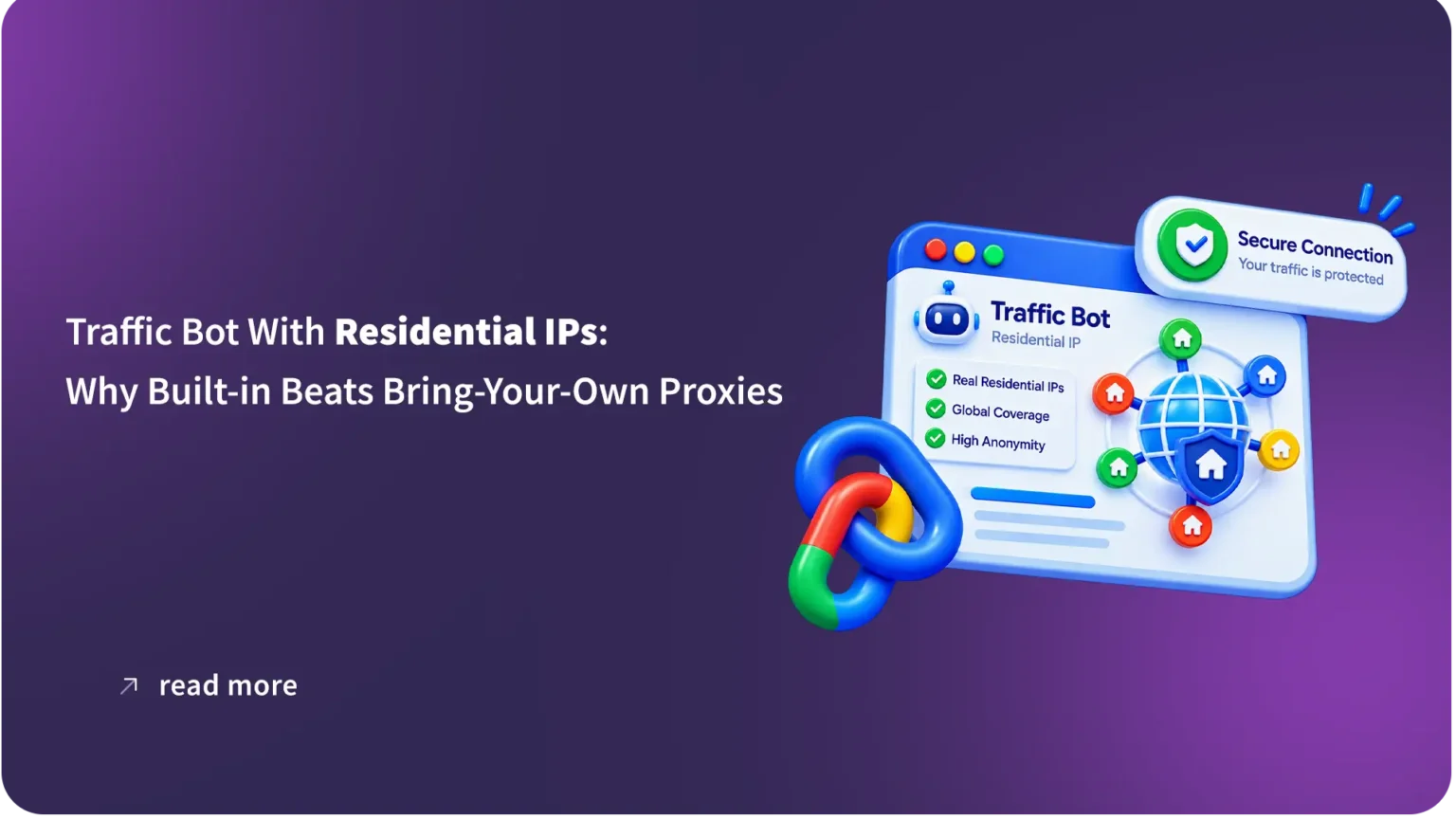
A traffic bot with residential IPs is a CTR and traffic automation tool that routes traffic through home-ISP addresses instead of datacenter or VPN ranges, so each session looks just like a real visitor. In Awesome Traffic Bot, the residential pool is built in under the name Dalga IPs: you choose a country, and optionally a region and a city, from 175+ countries on step 2 of the campaign wizard, and every thread gets its own rotating residential address.
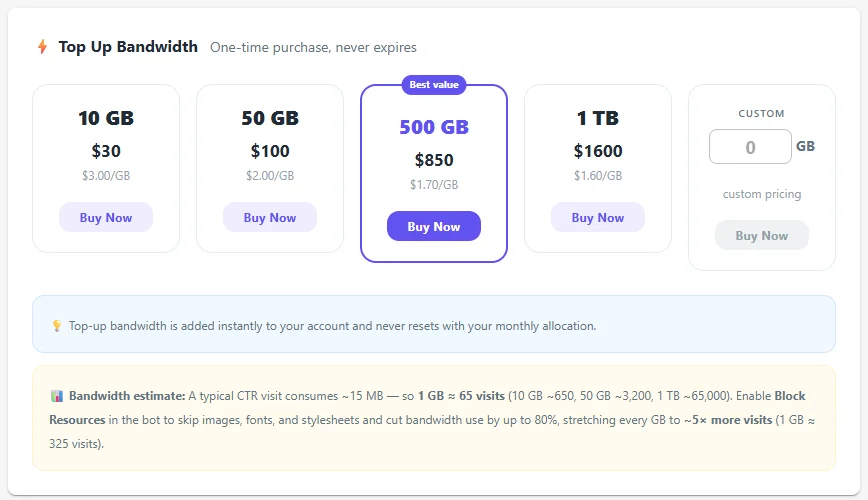
Bandwidth is billed per gigabyte; a typical visit uses about 15 MB, so one GB covers roughly 65 visits, or about 325 with images and video blocked. The app blocks any connection that would bypass the proxy and matches browser language and time zone and fingerprint to the address. Manual proxies, an Android phone, VPN files, and PPPoE remain available. Plans start at $24.90 a month on the annual plan.
| Traffic bot with residential IPs at a glance | Awesome Traffic Bot V2.2.0 |
|---|---|
| Residential pool | Dalga IPs, built into Awesome Traffic Bot, 175+ countries, city-level targeting |
| Billing | Per GB, monthly allocation with the license; top-ups of 10 GB ($30), 50 GB ($100), 500 GB ($850), 1 TB ($1,600) never expire |
| Bandwidth per visit | About 15 MB, or about 3 MB with images and video blocked |
| IPs per thread | One residential address per thread, rotating between sessions |
| Leak protection | Bypass connections blocked while Dalga IPs is active; WebRTC masked |
| Other IP methods | HTTP(S)/SOCKS proxies, Android phone 3G/4G/5G, OpenVPN files, PPPoE and FritzBox |
| Not supported | IPv6 proxies |
| Price | From $24.90/mo annual ($299/yr) or $49/mo monthly, 2 devices |
A traffic bot with residential IPs built in does one thing a bring-your-own-proxy setup never manages: every visitor arrives from a clean home connection in the country and city you chose, with nothing to configure. Since Awesome Traffic Bot added Dalga IPs, that is the default, not an add-on. This guide explains why the IP decides whether a click counts, what “built-in” changes, how much bandwidth a session really uses, and when your own proxies still make sense.
Search engines and analytics tools classify a visit before they read a single click, which is why a traffic bot with residential IPs starts ahead. The first signal they read is the IP address. Three families exist, and they are treated very differently.
The goal of a CTR campaign is simple: every click should look like it came from a real, plausible customer. That means a residential or mobile address in the right region, a fresh one for every session, and a browser with a matching language and time zone. A residential traffic bot handles the first two automatically; we’ll cover the third later in this post.
Before it was a traffic bot with residential IPs built in, ATB relied on lists. We have written before about running it with your own list in proxy mode and through VPN mode. Both still work. The difference in 2026 is that you no longer have to start there.
Dalga IPs is what makes Awesome Traffic Bot a true residential proxy tool, rather than just a bot that connects to external providers. It is billed by bandwidth and tied directly to your license, so you don’t have to deal with third-party providers, proxy lists, tuning the sessions and TTL, or configuration files. In practice, this ‘built-in’ integration changes five things.
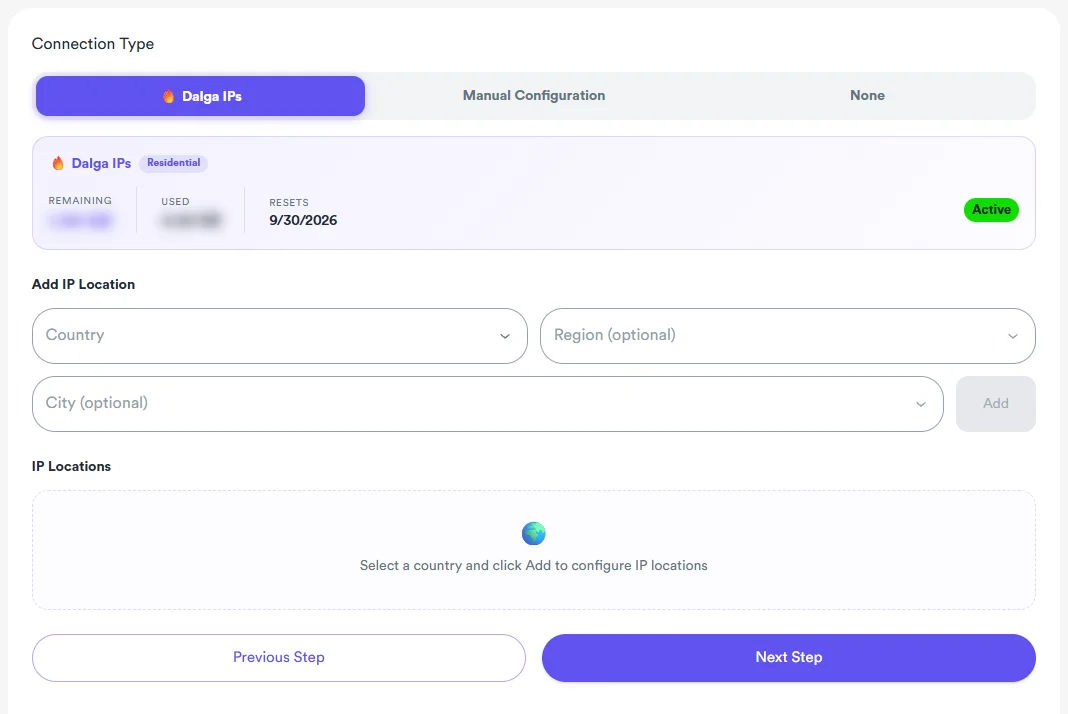
This is the part most people underestimate about a traffic bot with residential IPs. With a traditional proxy provider you buy a package, export a list in the right format, import it, test it, filter the slow ones, and repeat when the list ages. With a traffic bot with residential IPs built in, the setup is the country picker.
Want the picker instead of the proxy list? A traffic bot with residential IPs built in is what Awesome Traffic Bot ships as, on every plan.
Per-GB billing on a residential traffic bot only makes sense if you know what a typical visit consumes. The numbers below come straight from the app and the Dalga IPs documentation.
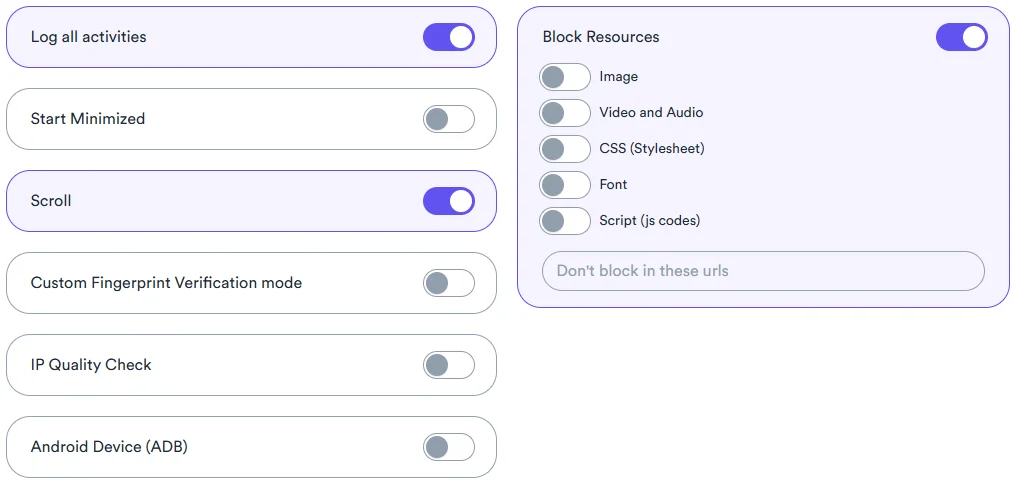
Here is what a traffic bot with residential IPs costs per month at three common volumes. The figures assume 15 MB per full visit and about 3 MB with images and video blocked.
| Visitors per day | Per month, full pages | Per month, images and video blocked |
|---|---|---|
| 50 | about 22 GB | about 4.5 GB |
| 150 | about 67 GB | about 13.5 GB |
| 300 | about 135 GB | about 27 GB |
When the included allocation runs out, you top up from inside the app. At the time of writing the Dalga IPs page lists one-time packages of 10 GB for $30, 50 GB for $100, 500 GB for $850, and 1 TB for $1,600, plus a custom amount. Top-up bandwidth never expires and does not reset with the monthly allocation. For a 150-visitor-a-day campaign with images blocked, a 50 GB package lasts well over three months.
Do these three and a traffic bot with residential IPs costs a fraction of what the same volume costs on a per-IP proxy plan, with none of the list maintenance.
A traffic bot with built-in residential IPs doesn’t mean you are locked in. Step 2 features a Manual Configuration panel with every IP method ATB has supported since 2019, and in some cases, those are still the best tools for the job.
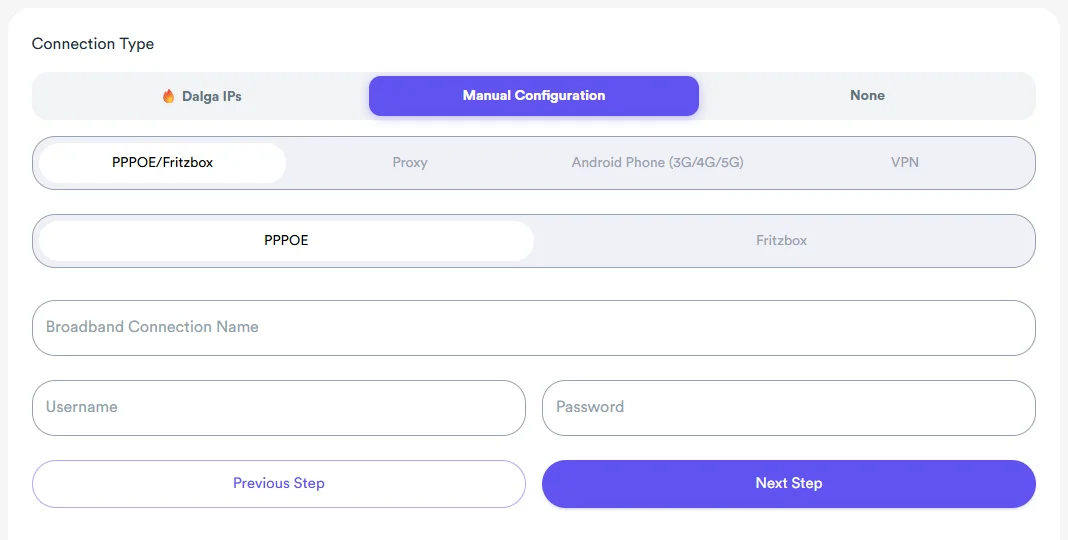
Our rule of thumb: use Dalga IPs for volume and geographic spread. The wizard will ask you to drop the Dalga IPs selection before it lets you add manual proxies to the same campaign, so keep the two approaches in separate campaigns.
A clean address from a traffic bot with residential IPs is wasted if the browser contradicts it. A residential address in Madrid with an English browser set to New York time is a mismatch, and mismatches are what detection systems look for. This is where a traffic bot with residential IPs has to do more than proxying.
Campaign settings also carry an IP Quality Check switch and a fingerprint verification mode, so a session can be checked before it is counted against your bandwidth. Combined with persistent browser profiles, a returning visitor from the same city with the same cookies is about as close to a real customer as automation gets.
In Campaign Settings, switch on Block Resources and tick Image and Video and Audio. Leave CSS, Font, and Script unticked unless you have a specific reason. If your site relies on an image-based analytics pixel, add its URL to the “Don’t block in these URLs” list. Set the device mix and the number of visitors as you normally would.
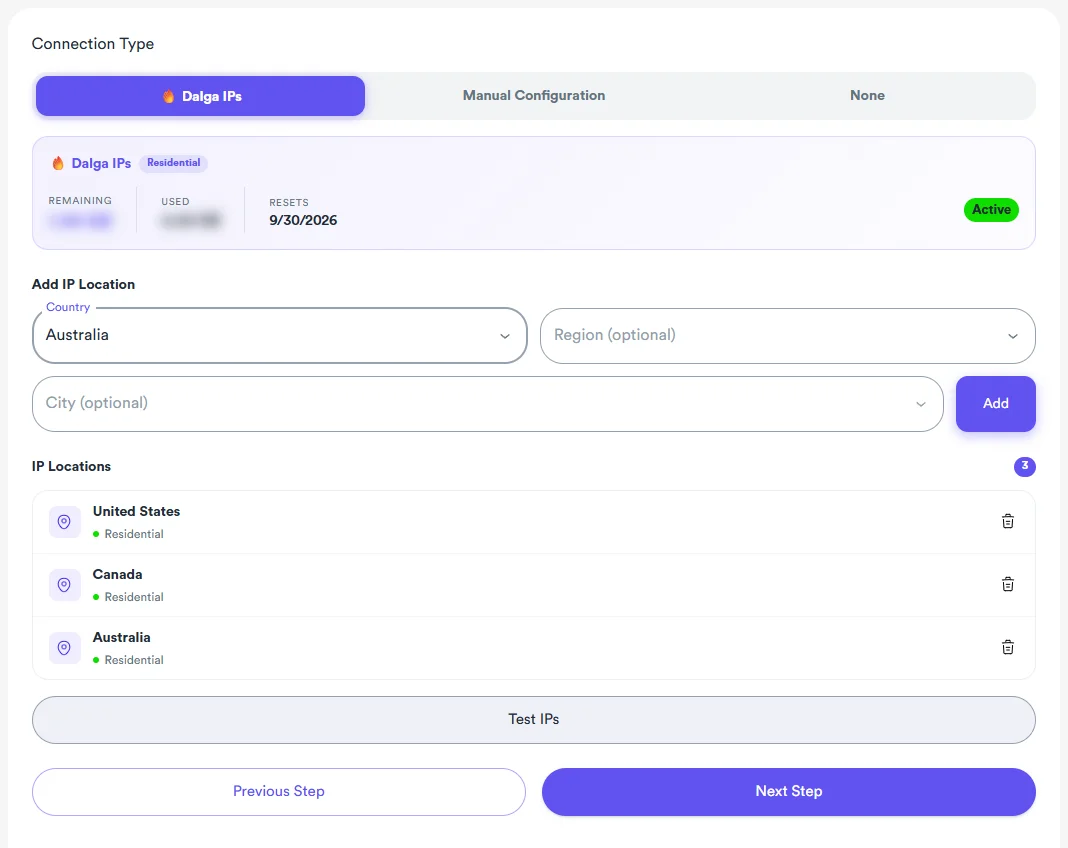
On the Changing IP step, select Dalga IPs. This is where the app becomes a traffic bot with residential IPs. The panel shows your remaining and used bandwidth and the reset date. Choose a country, add a region and city if the campaign is local, and click Add. Repeat for every location you want in the mix. A national campaign might list five or six states; a local one lists a single city. Either way, the traffic bot with residential IPs rotates a fresh address per session.
Add your tasks, create the campaign, and start the traffic bot with residential IPs. The circular gauge in the header shows remaining bandwidth at all times. The Dalga IPs page charts daily usage over the last 14 days and lists the destination hosts that consumed the most, which is the quickest way to spot a campaign that is heavier than expected. If a campaign visits a media-heavy site, that is where you will see it.
This is a true residential traffic bot, not just a tool with a proxy option. There are no separate subscriptions and no per-IP fees. When comparing vendors, the question is simple: ‘Is the residential pool built-in, or do I have to bring my own?’ The answer is the difference between automated traffic and spending your evenings managing proxy lists.
If you are evaluating tools, put the same six questions to every vendor. The answers separate a traffic bot with residential IPs from a bot that merely accepts a proxy list.
Awesome Traffic Bot answers all six the same way: Dalga IPs inside the app, city-level targeting, one address per thread, automatic leak blocking, automatic fingerprint matching, and about 15 MB per full visit. That is the checklist a traffic bot with residential IPs should pass before you enter a card number.
About 15 MB for a full visit that searches, clicks, and browses three or four pages, so roughly 65 visits per GB. With Block Resources set to images and video, usage drops by up to 80 percent and a GB stretches to around 325 visits. The header gauge shows the live balance.
Yes. Step 2 of the wizard lets you choose a country, then optionally a region and a city, and you can add several locations to one campaign. The bot rotates among them and every thread receives its own residential address from the selected places.
Yes, you absolutely can use your own proxies. While Dalga IPs handles the heavy lifting for most campaigns, the Manual Configuration section is still fully available and has not been removed. It remains there for whenever you prefer using your own list, an Android phone for carrier IPs, a VPN with OpenVPN files, or a direct PPPoE connection from your ISP. Just be sure to keep your manual and Dalga IP campaigns separate.
Facts in this guide come from the following primary sources, checked on 6 September 2026.
Pick a country, add a city, and send your first session from a traffic bot with residential IPs in the time it takes to read this sentence. Awesome Traffic Bot includes Dalga IPs, the anti-detect browser core, the captcha solver, and AI Mode on every plan. Plans from $24.90/mo (annual, $299/yr) or $49/mo monthly, 2 devices.