Send Views From YouTube Search: Easy 2026 Guide
How to send YouTube search views instead of direct traffic, in 5 easy steps: keyword choice, campaign setup, IPs, identity, and reading the Studio report.
 By Dalga team
Updated
6 min read
By Dalga team
Updated
6 min read
YouTube
YouTube search views happen when a user actually performs the search themselves: they type in a keyword, browse through the results, spot your thumbnail, and choose to click it. Only then does Studio log that as a ‘YouTube search,’ which is the only way it actually boosts the click-through rate for that specific keyword. If someone lands directly on your video URL, it gets filed under ‘direct traffic,’ and YouTube basically has no idea which search term brought them there.
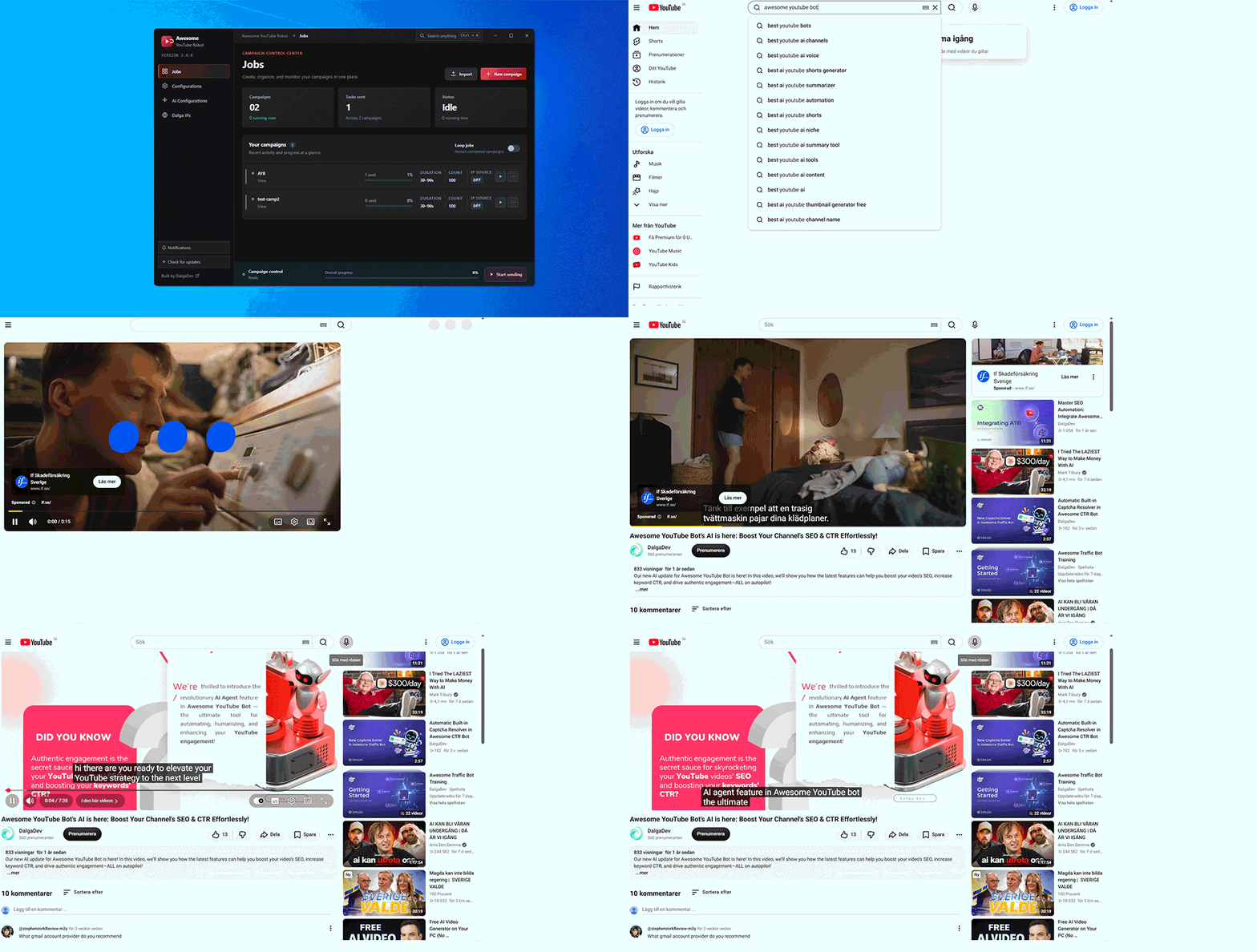
Why YouTube search views are worth more than direct ones
YouTube Studio reports where every view came from, and the categories are not decorative. Direct traffic, suggested videos, browse features, external sites and YouTube search are separate rows because they mean different things. A direct view says somebody had your link. A search view says somebody wanted what your video is about.
This is exactly why you want to aim for search views instead of taking a shortcut. Since these views are tied to a specific keyword, they help boost your click-through rate for that term. It is also the only way to really show YouTube that your video is the right answer to what a user is looking for.
What you need before sending YouTube search views
- A video that can plausibly appear for the keyword you choose. The session has to find your thumbnail in the real results, so if you are nowhere in the pages it scans, there is nothing to click.
- Gmail accounts. Views are sent from accounts, and anything beyond the watch needs a signed-in session.
- Residential IPs. Datacentre addresses watching videos look exactly like what they are.
- A realistic watch duration, set as a range rather than one fixed value; our guide to bot view duration has the numbers.
Step 1: pick a keyword that can produce YouTube search views
Most people mess this part up before they even start. Look for a phrase that your video is already ranking for, even if it is buried far down in the search results. Search for it yourself to see where your video actually lands. If you cannot find your video within the first few pages, just switch to a longer and more specific phrase.
A phrase with your brand or channel name in it is the easiest starting point, because you almost certainly rank for it already. It is also the safest way to confirm the mechanics work before spending volume on a competitive term.
Step 2: build the YouTube search views campaign
Open Awesome YouTube Bot, create a campaign and name it after the keyword so the logs stay readable later. In the first step of the wizard, the campaign goal, set the job mode to View and choose the task that watches videos from a keyword search rather than from a direct URL. That single choice is what turns ordinary views into YouTube search views.
Set the send count low for the first run. Fifty sessions is plenty to confirm that the video is being found and the views are registering. Set the duration as a range, for example 30 to 90 seconds, so hundreds of sessions do not all stop at the same second.
Step 3: choose the connection your YouTube search views use
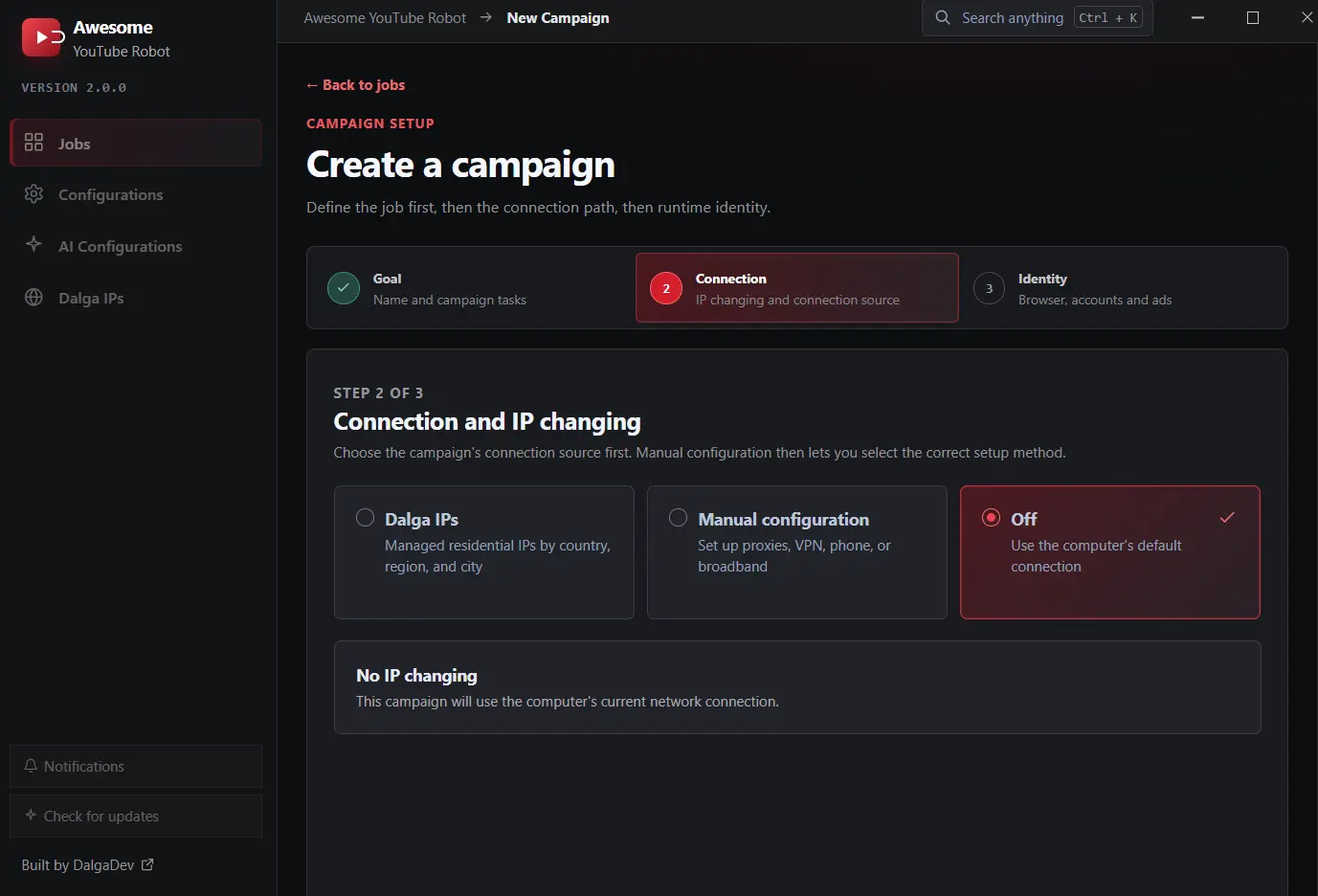
In the second step of the wizard, you set up your connection and IP source. If you choose Dalga IPs, the app uses its own built-in residential network where you can pick your country, region, or city. The manual configuration option is for when you want to use your own proxies, a VPN with OpenVPN files, an Android phone, a PPPoE line, or a FritzBox router. If you turn it off, the software just uses your computer’s regular connection, which you should really only do if you are running a quick test session.
Match the geography to the audience you actually want. If the video is in English for a UK audience, sessions arriving from a random spread of countries make the analytics less believable rather than more.
Step 4: set the identity
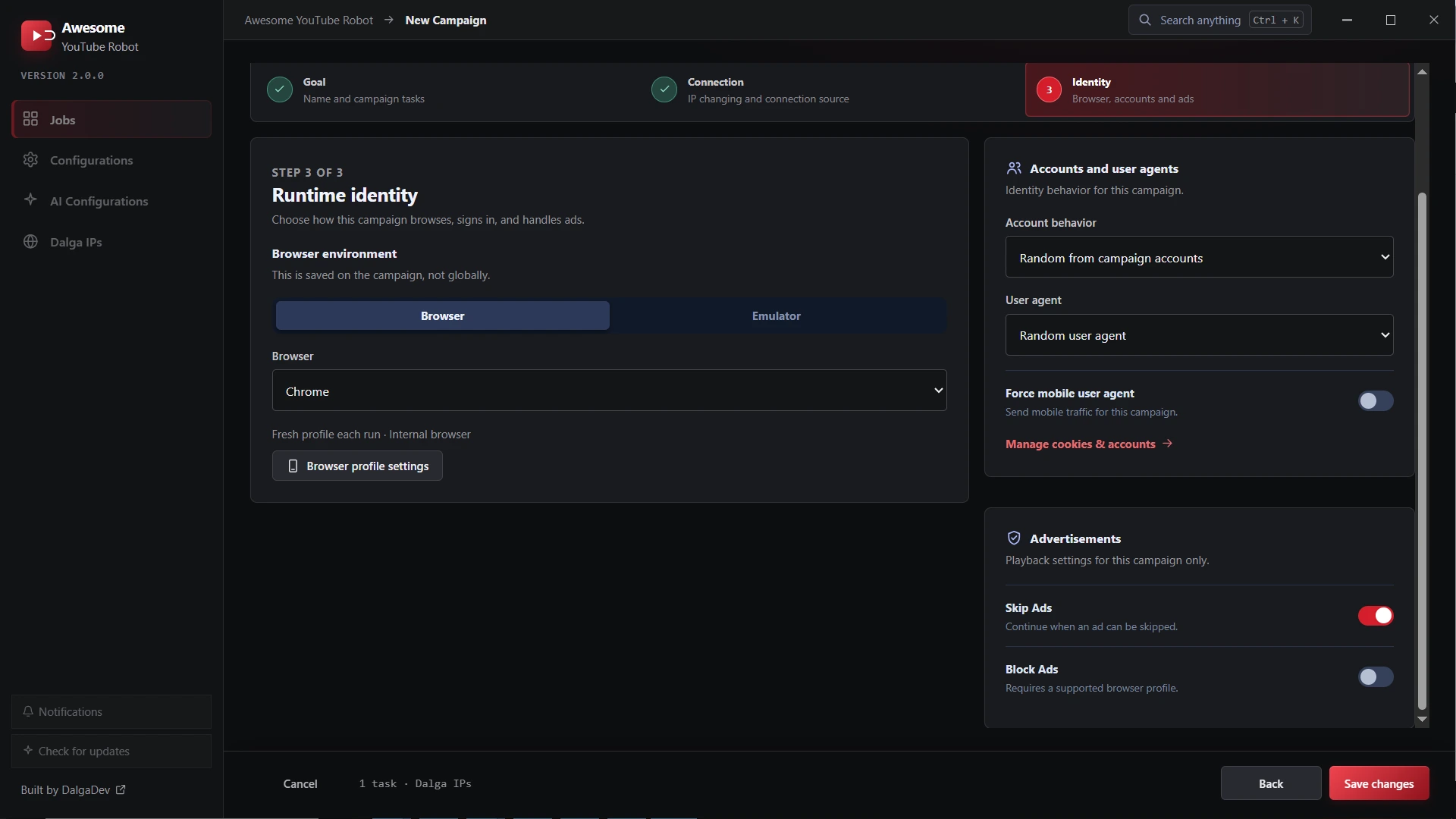
The third step covers the browser environment, the account behaviour and the user agent. Leave the fingerprint regeneration to the anti-detect core, pick how the campaign draws on your account pool, and decide whether to force a mobile user agent. A large share of real YouTube watching happens on phones, so a campaign that is entirely desktop is its own kind of pattern.
Step 5: run small, then confirm the YouTube search views landed
Start the campaign and leave it alone. The number that tells you whether it worked is not the view count, it is the traffic source breakdown in YouTube Studio. Give it a day, then open the traffic source report and look for YouTube search. That row is your YouTube search views. If your sessions are showing up as direct traffic instead, the task is still pointed at a URL rather than a keyword.
The second number worth watching is impression click-through rate for the keyword, which is what YouTube search views exist to move. That is the figure a search campaign is actually moving, and it is covered in more depth in our guide to the YouTube CTR bot approach.
Settings that decide whether YouTube search views register
| Setting | Value | Why |
|---|---|---|
| Task type | Keyword search, not direct URL | The search is what makes the view a search view |
| Watch duration | 30 to 90 seconds as a range | Under about 30 seconds a view may not register at all |
| Send count | 50 for the first run | You are testing attribution, not driving volume |
| View source mix | Weighted toward search, not only search | 100% of anything is the pattern to avoid |
| IP source | Residential, matched to the audience | Datacentre addresses are obvious |
| Mobile agent | On for part of the campaign | Real YouTube watching is heavily mobile |
Common mistakes with YouTube search views
- Choosing a keyword you do not rank for. The session scans real results. If you are not there, it cannot click you.
- A fixed watch duration. Identical lengths across every session are the easiest thing to group after the fact.
- Everything from one country. Pick geography deliberately rather than leaving it to whatever was cheapest.
- Jumping to volume. A flat spike on a channel with no history is the least believable shape a campaign can have.
- Running on a monetised video. Leave ad blocking on and keep campaigns away from monetised uploads.
Questions about sending views from YouTube search
How do I check my YouTube search views are attributed correctly?
Open YouTube Studio, go to the analytics for the video and look at the traffic source report. Sessions sent from a keyword search appear under YouTube search. If they are landing under direct traffic instead, the task is still configured with a video URL rather than a keyword.
How long before YouTube search views show in Studio?
Traffic source data usually appears within a day, though YouTube validates views rather than counting them instantly, so early numbers can move. Judge a run after twenty four to forty eight hours rather than in the first hour.
What if my video is not in the results at all?
Then pick a narrower phrase. The session has to find the thumbnail among genuine results to click it, so a keyword you do not appear for produces sessions that search, find nothing and leave. Brand and channel-name phrases are the usual starting point.
Should every view be a YouTube search view?
No. A traffic breakdown made up entirely of YouTube search views is as odd as one that is 100% direct. Mix the sources, weighted toward search for a ranking campaign, so the profile looks like an audience that found you several different ways.
Do I need a different keyword per campaign?
It is easier to read the results that way. One campaign per keyword, named after it, means the Studio report and the campaign logs line up when you are deciding what worked.
Sources
Awesome YouTube Bot
Awesome YouTube Bot automates views, watch time, likes, and comments with a full toolkit of IP-changing methods. Supports multiple campaigns, accounts, and targeting options.
- per month, annual plan ($299/yr)
- $24.90
- per month, monthly plan
- $49
- devices
- 2
Written by the Dalga team
We design and build Dalga products. Guides and release notes live on the blog, and every setting is documented on docs.dalga.dev.
Keep reading
All YouTube postsYouTube Bot Watch Time: How Long Should a View Be?
How long a YouTube bot watch time should be for a view to count, why a range beats a fixed value, and a table of 5 durations matched to video length.
Traffic Bot With Residential IPs: Why Built-in Dalga IPs Beats Bring-Your-Own Proxies
Why the IP decides whether a click counts, what built-in residential IPs change, real bandwidth math, and when your own proxies still make sense.
Awesome Traffic Bot 2.2 Is Live: 4 New Features That Change CTR Campaigns (2026)
Awesome Traffic Bot 2.2 adds an included captcha solver, a visual workflow editor, browser profile storage, and local AI through Ollama. What changed, where to find it, and how to update.