Awesome Traffic Bot/Bing CTR bot

Bing CTR Bot: Searches, Clicks and Dwell Time on Bing

Awesome Traffic Bot is a Bing CTR bot that opens bing.com from a residential IP, types your keyword, browses the results, finds your site and clicks it, then reads your pages the way a person would. Bing lists user engagement among its ranking inputs, so every session is built to look like engagement rather than a hit.

Made by Dalga since 2019. Rated 4.9/5 by 80+ users. Two computers per license.

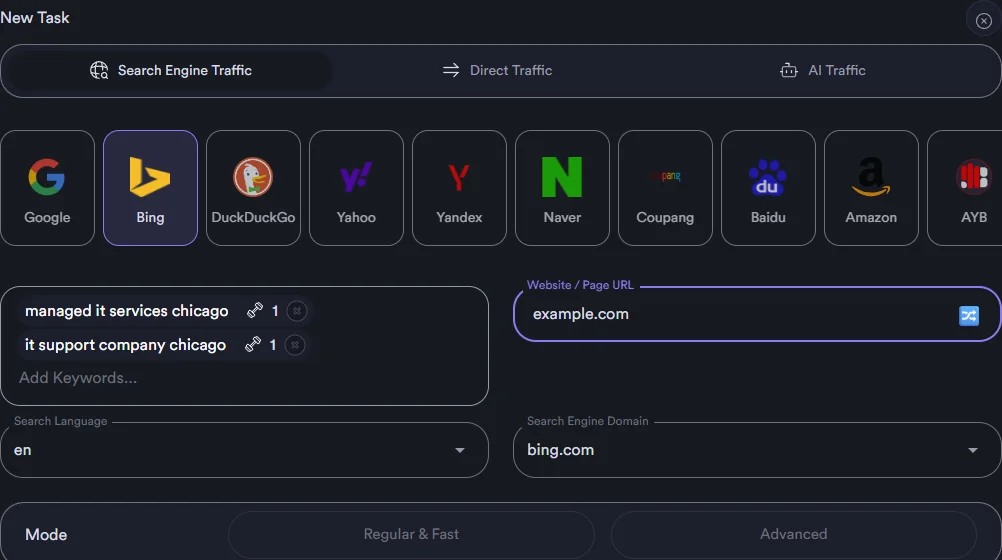
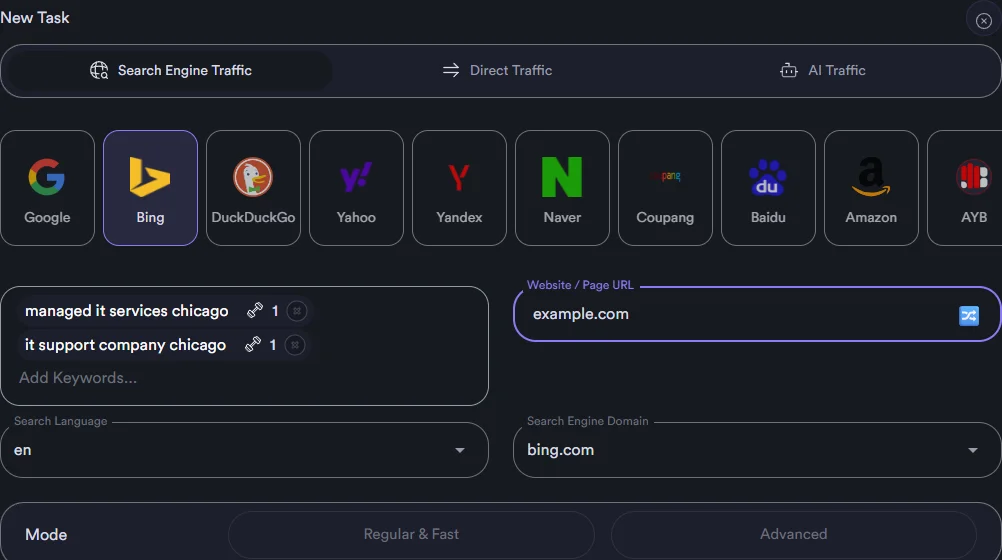
Bing CTR bot setup in Awesome Traffic Bot: Bing selected as the search engine, two weighted keywords, the target website field and bing.com as the engine domain
Why Bing

Why run a CTR bot on Bing at all?

Bing is smaller than Google, and that is the point. Its index feeds several other engines, its ranking team talks openly about engagement, and almost nobody in your niche is running CTR campaigns on Bing.

  1. 01

    Engagement is on Bing’s own list

    Bing’s ranking guidance names user engagement next to relevance, quality and freshness: whether people click a result, how long they stay, and whether they come back and search again. That is exactly the signal these sessions produce.

    Ranking signal
  2. 02

    One index, several engines

    Yahoo Search and Ecosia serve Bing results, DuckDuckGo draws most of its results from Bing, and Microsoft Copilot answers from the Bing index. A position earned on Bing tends to travel with it.

    Index reach
  3. 03

    Less noise, less competition

    Most CTR tools are built for Google only, so a Bing campaign meets almost no competition. A modest, steady campaign stands out. ATB also has native DuckDuckGo and Yahoo tasks if you want those engines covered directly.

    Competition

What clicks cannot fix, only your site can: content relevance, quality and credibility, page load time.

Session walkthrough

How does a session run on Bing?

Every Bing task runs in Advanced mode, the full human simulation. The faster Regular mode exists for Google only, which is why that selector is greyed out on a Bing task.

  1. A fresh identity

    The session starts from a residential IP in the country you chose, inside a browser profile with its own fingerprint. Browser language and time zone follow the IP automatically.

  2. Search on bing.com

    The bot opens the Bing domain set on the task, types one of your weighted keywords at a human pace, and waits for the results.

  3. Browse and find

    It scrolls the results, moves to the next page if needed within the range you set, and looks for a result that contains your domain. A clicking chance under 100% means some sessions search and leave without clicking, as real users do.

  4. Click and read

    After the click it stays on the landing page for the dwell time you set, scrolls, then visits more pages through internal links. Three to four pages over 80 to 120 seconds is the setting we recommend.

  5. AI Mode

    Describe the visit in a prompt and an AI model, cloud or local, steers the browsing on your site: what to read, where to scroll and which page to open next.

Bing sessionLive
  • Typing managed it services chicago0:02
  • Scrolling Bing results, page 10:09
  • Your result clicked, position 60:14
  • Reading the pricing page, 3 more pages0:47
  • Counted as organic Bing trafficCTR +1
One session, start to finish
A single Bing session, step by step: the keyword typed on bing.com, the results browsed, your listing clicked, then the dwell time and extra pages that make it read as engagement.
Manage AccountSigned in
JD
j•••••@email.com

Aged 14 months

Session cookie reused2FA 481 209
The bot rotates through a group of aged Microsoft accounts, reusing saved session cookies and answering two-factor prompts, so each Bing search runs as a logged-in user.
Accounts

Logged-in Bing searches with Microsoft accounts

Switch Use Bing Account to Yes and the bot signs in with a Microsoft account before it searches. Logged-in searches from accounts with history carry more weight than anonymous ones.

Manage Account holds the accounts: import them in bulk, sort them into groups, add two-factor codes, and choose whether the bot logs in every time or reuses saved session cookies for a faster, smoother run.

  • Outlook and Microsoft accounts, thousands per group
  • Two-factor and one-time codes handled inside the app
  • Fresh login per session or saved session cookies
Random ClickPositions 1 to 10Clicks this run: 0
  • 1
  • 2
  • 3
  • 4
  • 5
  • 6
Random Click mode in motion. The bot clicks a different Bing result each session inside the position range you set, which is how profiles warm up before they ever touch your domain.
Warm-up

Warm up profiles with Random Click mode

New profiles that only ever click one domain look odd. Random Click mode, the shuffle toggle next to the target field, makes the bot click random Bing results inside a position range instead of yours. Run it for a few days on generic keywords, then point the same profiles at the real target.

  • Position range From and To per task
  • Available on Google, Google Maps and Bing
  • Same keywords, same IPs, no target yet
Bing CTR bot task with weighted keywords, the target website, search language en and search engine domain bing.com
Weighted keywords, the site to find in the results, search language and the Bing domain.
Keywords

Weighted keywords and the target Bing actually shows

Add as many keywords as you like and give each a weight, so the phrase that matters runs more often. In the target field write the domain exactly as Bing displays it in results, because the bot looks for a result that contains that text. Turn on exact match when a competitor’s address contains yours. This is the step most setups get wrong: the target has to match what Bing prints, not what your address bar shows.

  • Keyword weights, with bulk editing on long lists
  • A domain-only target also covers your subpages
  • Placeholders for keyword and website when importing from a file
Task settings

Which task settings matter on Bing?

These are the fields on a Bing task and the values we would start with for a site that already sits on page one or two of Bing.

9 fields on a Bing task

Every value below is a starting point for a site already on page one or two.

  • 01

    Search Engine Domain

    We would start withbing.com, or the Bing edition your market uses

    Keeps the search on the version of Bing your customers see.

  • 02

    Search Language

    We would start withThe language your customers search in

    Bing localizes results by language. The browser language itself follows the IP.

  • 03

    Clicking Chance (CTR)

    We would start with30 to 60%

    A result that gets clicked by every searcher is not believable. Some sessions should search and leave.

  • 04

    Browse Result Pages

    We would start with1 to 3 for page-one sites, wider for page two and three

    The bot only clicks when it finds you inside the range, so set it to where you actually rank.

  • 05

    Speed

    We would start withMiddle of the slider

    Slower typing and scrolling reads as human. Faster spends fewer IP minutes.

  • 06

    Use Bing Account

    We would start withYes, with a group of aged accounts

    Logged-in history is the difference between a click and an engaged user.

  • 07

    Delay on the main webpage

    We would start with40 to 80 seconds

    Dwell time is one of the engagement signals Bing describes.

  • 08

    Visit Other Webpages

    We would start withOn: 3 to 4 pages, 80 to 120 seconds, internal links only

    Multi-page sessions with a low bounce rate look like research, not a hit.

  • 09

    Connection

    We would start withDalga IPs, country and city matched to the keyword

    Residential addresses in the right place, with no proxy setup.

Use cases

Who is this for?

Three situations where Bing traffic earns its keep.

Sites already on Bing page one or two

CTR campaigns on Bing work best where you already appear, because the bot has to find you inside the result pages it browses. Page two to page one is the classic move, and the cheapest.

Page two to one

B2B and desktop-heavy niches

Bing is the default on Windows and Edge, so business audiences searching from a work PC use it far more than consumers do. For them, Bing is cheap insurance next to your Google work.

B2B

Agencies covering every engine

One campaign, one task per engine. Run the Bing task beside Google, DuckDuckGo and Yahoo tasks and report all four from the same logs.

Agency
Bing vs Google

What is different about running it on Bing?

Same engine underneath, different search page. This is what changes when a campaign moves from Google to Bing.

On BingOn Google
Simulation modeAdvanced only: type, scroll, browse, click, readRegular (fast) or Advanced
Signed-in searchesYour Microsoft accounts, imported in bulkYour Google accounts
Maps campaignsNot available; Bing Places is not a taskGoogle Maps with GPS simulation
Where a position shows upBing, and the engines it feeds: Yahoo, Ecosia, DuckDuckGo, CopilotGoogle only
CompetitionFew CTR tools support Bing; a modest campaign stands outCrowded
Warm-up, keywords, IPs, dwell timeIdentical: Random Click mode, weighted keywords, Dalga IPs, Visit Other Webpages

Not a Microsoft Rewards script: it searches your keyword and reads your site, it does not farm points.

Pricing

Plans that include Bing

Simple pricing, the full software on every plan, Bing tasks included. Prove it on your own Bing keyword for $5 first.

Trial

1-day license

$5/ 1 day

Prove it on your own Bing keyword. Every feature for one full day.

  • 1 day of full access, 2 devices
  • Bing tasks and every other engine
  • 1GB free Dalga IPs bandwidth
  • 500 Captcha Solver credits
Start the $5 trial

Continues as Monthly at $49 after the day unless you cancel in My Account, one click.

Monthly

30-day license

$49/ month

Flexibility and full access, cancel or scale any time.

  • 2 devices
  • Bing tasks with accounts, warm-up and CTR control
  • AI support
  • 2GB Dalga IPs bandwidth
  • 1,000 Captcha Solver credits
  • Advanced functions
Buy Monthly

Renews monthly, cancel any time.

Instant license delivery · secure checkout · 7-day refund if a technical problem cannot be resolved by support · see the full product page

FAQ

Questions people ask before buying

Bing states that user engagement, including clicks, dwell time and repeat searches, is one of its ranking inputs, and Awesome Traffic Bot produces sessions shaped like that engagement. We do not promise a position. Ranking still depends on content, links and how believable the campaign is. Start small, keep the clicking chance realistic, and read Bing Webmaster Tools before scaling up.

A visit from the bot arrives from bing.com with a normal referrer, so Google Analytics files the session under organic search from Bing, and Bing Webmaster Tools counts the impression and the click on your keyword. The keyword itself is not passed to your site, as with any search engine.

No. The bot can search anonymously. Accounts add history and weight. If you use them, import them into Manage Account, group them, and let the bot reuse saved session cookies instead of logging in every time.

Not today. The Map sub-service exists for Google Maps and Naver Maps. On Bing the bot targets web search results only; Bing Places listings are not a task type.

Dalga IPs, the built-in residential network, with the country and city picked to match the keyword. Your own proxies, a VPN, PPPoE or Android tethering also work if you already have them. IPv6 proxies are not supported.

Not automatically, but Awesome Traffic Bot has DuckDuckGo, Yahoo, Yandex, Naver, Coupang, Baidu, Amazon and Google as separate engines. Add one task per engine inside the same campaign and split the visitors between them.

Same engine underneath, different search page. On Bing the bot always runs the full Advanced simulation, cannot use the fast Regular mode, signs in with Microsoft accounts instead of Google ones, and has no Maps sub-service. Everything else, from weighted keywords and Dalga IPs to dwell time and Visit Other Webpages, is identical, so a campaign you already run on Google can be cloned to Bing in a minute.

With Dalga IPs or proxies there is no fixed cap: every thread gets its own IP, and a 4-core, 8 GB machine runs about five threads comfortably. Single-IP modes such as a VPN or a phone give roughly one session per minute per machine. AutoPilot picks the thread count for you.

Still have a question about Bing tasks?The team answers in the chat, usually the same day.

Start a Bing campaign this afternoon

One day, every feature, two computers. Dalga IPs are ready when you are. Full product page

Start the $5 trial
Search