Trial
1-day license
$5/ 1 day
Full access for a day, tiny price, prove it works on your own listing.
- 1 day of full access
- Google Maps mode and every engine
- 1GB free Dalga IPs bandwidth
- 500 Captcha Solver credits
- Renews at $49/month

Search Maps from a GPS point inside your service area, find your listing by name and act like a customer. Six listing actions, four ways to simulate location, residential IPs in the right city.
One day of full access for $5, then $49 a month or $299 a year. Made by Dalga since 2019, rated 4.9/5 by 80+ users.
Switch a Google task to the Map sub-service and the target becomes a business name, with the listing actions under Manage List. Watch a campaign being built, then follow the five steps a session takes.
A residential IP in the business’s city, and a GPS point dropped at random inside one of your circles.
The bot types a weighted keyword such as “dentist near me” and waits for the map results.
It scrolls the results and picks your business by name. The = prefix forces an exact match.
Reviews, hours, directions, bookmark, website. Each action runs in order and rolls its own chance.
40 to 80 seconds on your site, then two or three more pages through internal links.
Fifteen things a Google Maps CTR bot campaign gives you on the first day, all of them inside one license. Filter by the part you care about.
Pick the Google engine, switch the sub-service to Map, and the task becomes a Google Maps CTR bot: a business name instead of a URL, and the six listing actions under Manage List.
SetupSessions scroll the map results and pick your listing the way a customer would. Write =Your Business Name when a competitor’s name contains yours and only an exact match will do.
Setup“Category near me”, “category city”, “service neighbourhood” and your brand, each weighted, so the searches a Google Maps CTR bot types look like real demand rather than one phrase on repeat.
SetupName, keywords, a circle on the map, the actions you want. Clone the task for the next listing and change two fields. No scripts to write and nothing to install on a server.
SetupDraw circles on the map, type place names, paste coordinate pairs or ranges, or import a file. Circles hand every Google Maps CTR bot visitor a fresh random point, so no two sessions share a position.
LocationDalga IPs covers 175+ countries with city-level targeting, so the address a session comes from matches the neighbourhood it claims to be standing in. Bandwidth is included, top up any time.
LocationBrowser language, locale and clock are set from the connection, so nothing in the session contradicts the place it is searching from. It is the mismatch that gets noticed, not the visit.
LocationOpen the website, read the reviews, check the information, ask for directions, save the place, or let the AI perform an interaction you describe. Each one rolls its own chance and delay.
ActionsAfter the website action the Google Maps CTR bot stays 40 to 80 seconds, scrolls, and follows internal links to two or three more pages, so Analytics records an engaged visit rather than a bounce.
ActionsRandom Click sends new profiles around nearby businesses for the first few days, so they carry history before the Google Maps CTR bot ever opens your listing. That is what an ordinary local user looks like.
ActionsThe anti-detect core rotates user agents and matches canvas, WebGL, hardware, screen size, WebRTC and time zone to the IP, so every Google Maps CTR bot session looks like a different real device.
Staying unseenThe inline solver handles reCAPTCHA and challenge pages without stopping the visit or asking you to plug in a third-party service. Solver credits come with every plan.
Staying unseenSet a different visitor count for every time slot, so the Google Maps CTR bot works the hours real customers search in and nothing arrives as one flat block at three in the morning.
ScaleClone a task, change the business name and the circles, and a Google Maps CTR bot runs per branch or per client, each with its own city, its own IPs and its own logs.
ScaleGoogle Maps CTR bot mode, GPS simulation, residential IPs and every other engine are in every license, on two computers, with no add-on to buy. Try your own listing first on the one-day license.
PlanEverything here is in every plan: no add-ons, no per-listing fee, two computers per license, rated 4.9/5 by 80+ buyers.See the plans
Google says local ranking comes down to relevance, distance and prominence. A Google Maps CTR bot cannot change your address or your review count. It can produce the behaviour that sits on top of those three.
Maps decides what is near from the browser’s geolocation, not only from the IP. ATB sets both: a residential IP in your city and a GPS point inside a radius circle you draw, different for every visitor.
Click on website, read reviews, check information, request directions, save the place, or describe an interaction for the AI to perform. Each action runs with its own chance and delay, in the order you set.
Sessions search your category, scroll the map results and choose your listing among competitors. Direction requests and website clicks from a listing are the strongest intent signals a profile can receive.
Fixed by the profile, not by traffic: address and service area review count and ratings category and business data
Whatever you type into GPS Simulation, the bot turns it into one set of coordinates per visitor. Four ways in, the same behaviour out: a location inside your service area that no two sessions share.
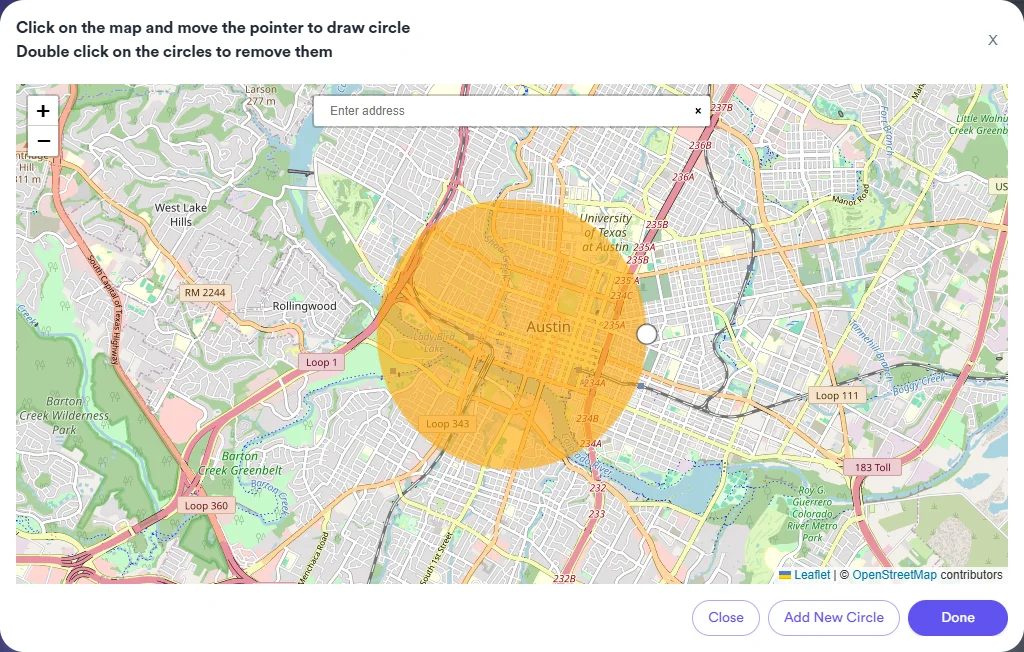
A fresh random point inside the circle for every visitor.
Each name is resolved once, then the list rotates visitor by visitor.
A pair is used as written. A range is randomised inside the box.
All 128 lines join the same rotation, whatever format they use.
Open Manage List and add the actions a visitor should perform after finding you. Every action has a chance and a delay range, and they run in order. Mix them so sessions differ: some only read reviews, some ask for directions and leave, some end on your website.
Browser language and time zone follow this IP.
A fresh point inside your 2.4 km circle for every visitor.
Google reads two location signals. The IP gives a city-level position; the browser’s geolocation gives the precise one that Maps uses to decide what is near. They should agree.
Pick Dalga IPs with the business’s country, region and city on step 2 of the campaign wizard, then let GPS Simulation place the visitor inside the service area. GPS Simulation does not change the IP. A local SEO bot that gets only one of the two layers right looks like a tourist, not a customer.
Three situations where a local SEO bot earns its keep.
The map pack shows three listings. A Google Maps CTR bot gives a listing that already ranks nearby the behavioural signals it is missing: category searches, selections, direction requests, website clicks.
Local businessOne campaign per client with its own GPS circles and its own Dalga IPs city. A GMB CTR bot task per listing, all reported from the same logs and the same dashboard.
AgencyClone a task, change the business name and the circles. A Google Business Profile CTR bot campaign for twelve branches takes an afternoon, not a week.
Multi-locationTwo client reports, scanned on the same grid before the campaign and again weeks later. Drag the handle, or tap Before / After to see a whole scan.
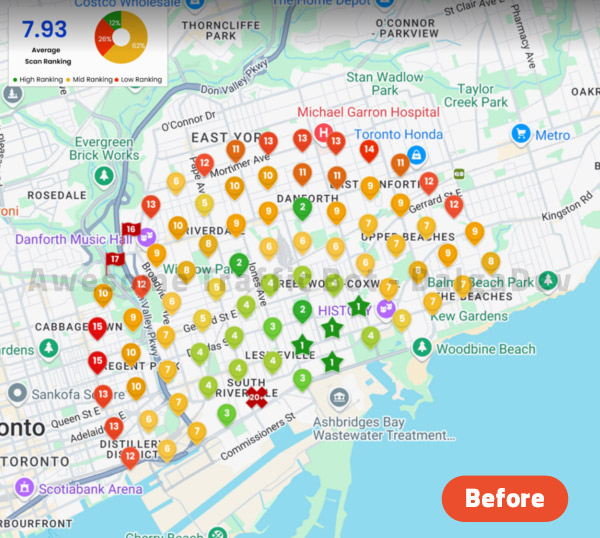
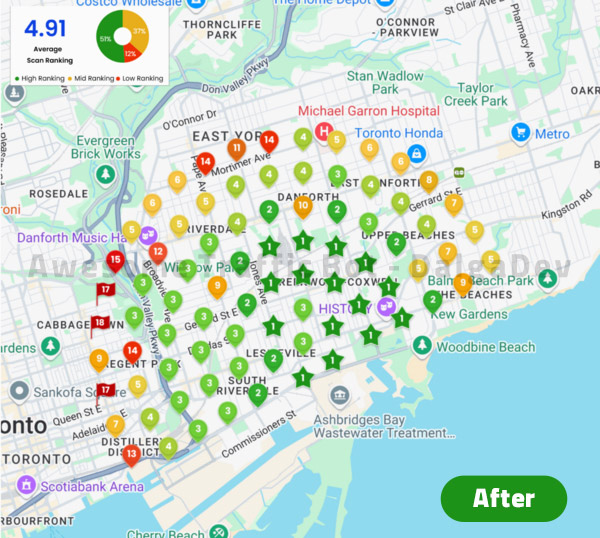
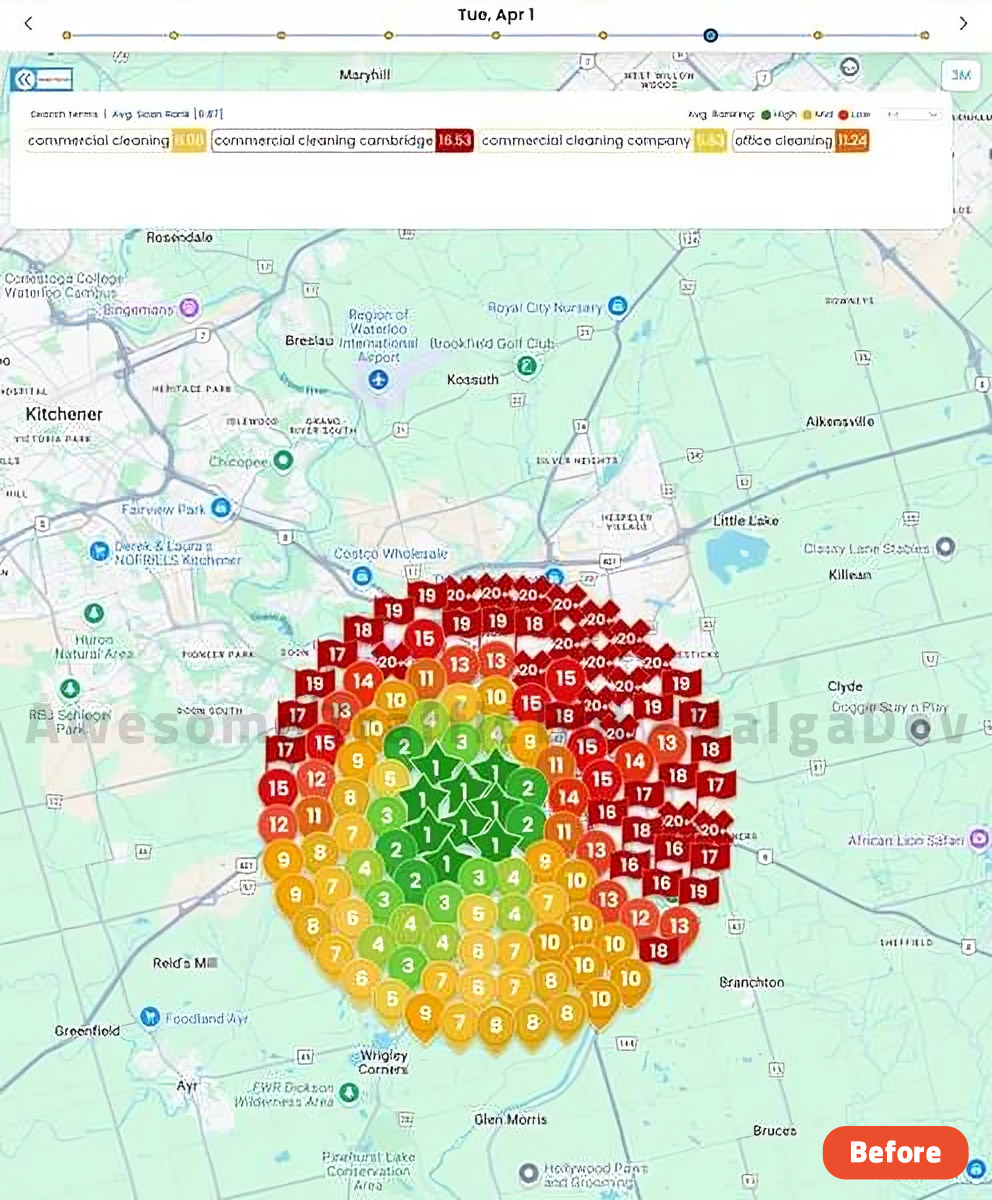
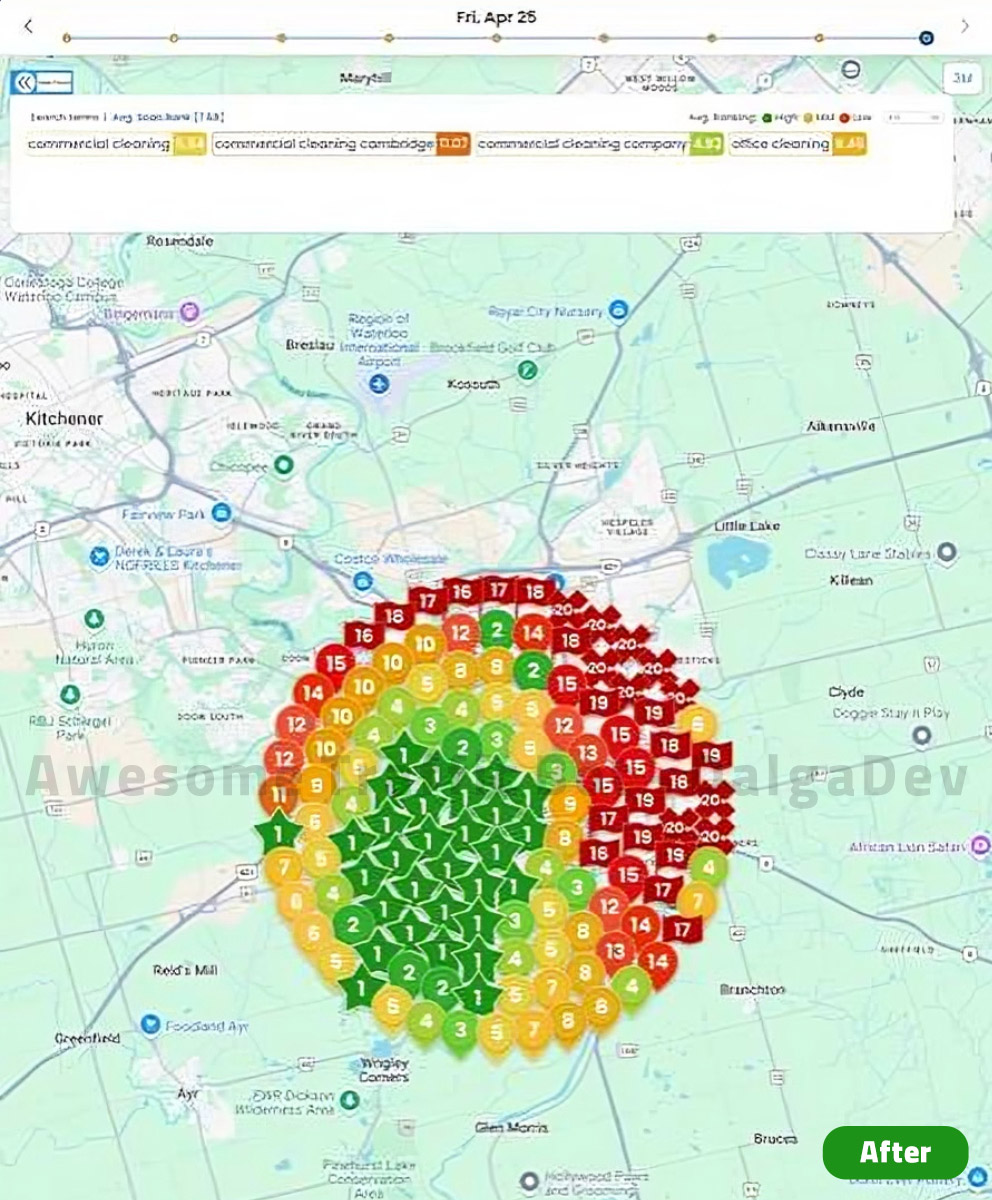
Drag a handle to compare, or open either scan at full size.·More results on the product page
Simple pricing, the full software on every plan, Google Maps mode included. Pick how long you want to run.
1-day license
Full access for a day, tiny price, prove it works on your own listing.
30-day license
Flexibility and full access, cancel or scale any time.
365-day license
Billed annually at $299. Best value for long-term users and teams.
Instant license delivery · secure checkout · rated 4.9/5 by 80+ verified users · see the full product page
The business name, exactly as it appears on the Google Maps listing. A Google Maps CTR bot finds your listing by name in the map results. Prefix it with = when a competitor's name contains yours, so =Bright Smile Dental Austin will not settle for Bright Smile Dental Care.
The IP places the visitor at city level. GPS Simulation sets the browser's geolocation, the precise signal Google Maps uses to rank what is near. ATB spoofs the geolocation inside the task; the IP comes from your connection method, ideally Dalga IPs in the same city. Both should agree.
Yes. Click on website is one of the six listing actions. After the click the session continues on your site with the dwell time and Visit Other Webpages settings you chose, so it counts as an engaged visit.
Searches, listing views, direction requests and website clicks are the interactions the Business Profile performance report counts. Because the sessions come from real browsers at real positions, they are recorded like other visits. Give Google a few days; the report lags.
No. Click reviews opens and reads the reviews tab. A Google Maps CTR bot never writes reviews. Fake reviews break Google's policies and are the fastest way to lose a listing.
Yes. The Naver task has a Map service that works the same way: business name as the target, listing found in the Naver Maps results. The Korean walkthrough is linked below.
No. A listing without a website still gets searches, selections, review reads, information checks and direction requests. Leave Click on website out of the action list and the Google Maps CTR bot session ends on the listing itself. If you do have a site, keep the website action in, because a click that turns into a real visit is the strongest of the six signals.
Start near the listing's real volume: a few dozen sessions a day spread across the day, with a mix of actions and a clicking chance well under 100%. Increase slowly while watching the Business Profile performance report. Volume spikes are the easiest pattern to spot.
Google Maps CTR bot mode, GPS simulation and residential IPs are in every plan. Start with a day of full access for $5.